
YouTube Shorts Monetization Requirements Explained
So, you want to start making money from your YouTube Shorts? The first step is getting into the YouTube Partner Program (YPP), and YouTube gives you a couple of ways to do it.
The main path for Shorts creators is hitting 1,000 subscribers along with 10 million valid public Shorts views in the last 90 days. If long-form video is more your style, you can also qualify with 1,000 subscribers and 4,000 public watch hours on your traditional videos.
Cracking The Code On YPP Entry
Think of the YPP as the club where monetization happens. YouTube smartly created two different entryways because they know that what works for a long-form vlogger is totally different from what works for a Shorts creator. You don't have to be a master of both formats; you just need to crush it in one.
Which path you aim for really comes down to your channel's vibe. Are you all about quick, punchy content designed to go viral? Then the 10 million Shorts views target is your game. If you're building a library of in-depth videos that keep viewers hooked for longer, the 4,000 watch-hour goal will be a more natural fit.
Understanding The Two Main Paths
To get things straight, YouTube actually has two tiers of the Partner Program now. The first tier unlocks "Fan Funding" (like Super Thanks and Channel Memberships) with lower requirements. The second tier is the full-blown YPP, which is where ad revenue sharing for Shorts and long-form videos kicks in.
Let’s look at how these tiers stack up.
YouTube Partner Program Eligibility Tiers
As you can see, the path to earning from Shorts ads is a sprint—it demands a huge burst of viewership in a short 90-day window. In contrast, the watch-hour requirement is more of a marathon, rewarding steady, long-term audience engagement.
The key takeaway is that YouTube values both explosive, short-term virality and long-term audience retention. Your path to monetization is about choosing the lane that best fits your content style and audience behavior.
A single viral Short could rocket you past the 10 million view mark faster than you'd think, but it takes a different kind of skill to build up 4,000 watch hours. Nailing down your creation process is critical, which is where a solid tutorial on https://www.quickads.ai/blog/how-to-make-youtube-shorts can really help you get ahead.
No matter which route you take, they both lead to the same awesome place: full YPP membership. Once you're in, you can start earning from ads, channel memberships, Super Thanks, and everything else YouTube offers. If you want a deeper dive, this practical guide on how to monetize YouTube Shorts is a fantastic resource.
Fan Funding: Your First Step to Earning on YouTube
Let's be real—waiting to hit 1,000 subscribers and 10 million Shorts views can feel like an eternity. YouTube gets this. That's why they created an earlier entry point into the monetization game, designed to get money into the pockets of growing creators much sooner.
Think of it as a launchpad. It’s a way to start earning directly from your community long before you're eligible for the big leagues of ad revenue.
How You Can Start Earning Sooner
This first tier is all about fan funding. Instead of relying on ads, you're giving your most loyal viewers a chance to support you directly. It's a fantastic way to build a more stable income stream because it comes from people who genuinely love what you're doing.
This whole system is a smart move by YouTube. It gives creators a much-needed boost and a tangible reward for their hard work. Hitting these smaller milestones keeps the motivation high.
To get in on this early tier, you only need 500 subscribers, 3 public uploads in the last 90 days, and then one of two things: either 3 million public Shorts views in the last 90 days or 3,000 long-form watch hours in the past year. You can get more insights on how these updated requirements empower emerging creators.
Essentially, this approach validates your effort at an earlier stage, which is a huge motivator as you push toward the larger goal of full ad-sharing.
What Fan Funding Actually Unlocks
Once you meet these more accessible goals, you get a whole toolkit designed to help you connect with your audience and open up new ways to earn.
Channel Memberships: This is where you can offer exclusive perks—like custom emojis, members-only videos, and special badges—to viewers who pay a monthly fee. It helps you build a tight-knit community of your biggest supporters.
Super Thanks: Think of this as a digital tip jar. Viewers can buy a cool, one-time animation that pops up on your Shorts to show some extra love for your content.
YouTube Shopping: Got merch? You can connect your own store right to your channel and feature products directly on your Shorts. It turns your content into a storefront.
This isn't just about making money earlier. It's about building a stronger, more invested community. When a fan buys a membership or sends a Super Thanks, they're not just a viewer anymore—they're an active partner in your channel's success.
By jumping on these fan funding opportunities first, you create a solid foundation for your income that's often more predictable than ad revenue, which can go up and down. You’re building a loyal base that will stick with you as you grow and eventually hit the full YouTube Shorts monetization requirements. It’s all about getting rewarded at every critical stage of your journey.
How YouTube Shorts Ad Revenue Actually Works
Hitting those subscriber and view-count milestones is a massive win, but it’s really just the first step. Now comes the important part: understanding how money actually gets from an advertiser’s budget into your bank account. The system for Shorts is a whole different ballgame compared to traditional long-form videos.
Instead of ads playing directly on your specific video, YouTube gathers all the revenue from ads shown in the Shorts feed into one giant pot. Think of it as a shared piggy bank for all eligible creators, which YouTube officially calls the Creator Pool.
The Journey From Ad Spend to Your Pocket
Every month, advertisers fill this pool with cash for all the ads viewers see while scrolling through Shorts. But before that money makes its way to creators, YouTube takes care of a couple of things first. A slice of the pool is immediately used to cover music licensing fees.
This is actually a brilliant setup for creators. It means you can use trending, copyrighted songs from the YouTube audio library in your Shorts without getting hit with a copyright claim or losing monetization. It’s a huge relief.
Once the music labels get their cut, the remaining money becomes the official Creator Pool, ready to be divided among creators. From this final amount, creators collectively get to keep a 45% share. Your personal slice of that 45% isn't based on how many ads ran next to your content, but on how your channel's views stack up against everyone else’s.
This infographic shows the initial requirements to get your foot in the door with fan funding, which is an earlier step on the path to full ad-revenue sharing.
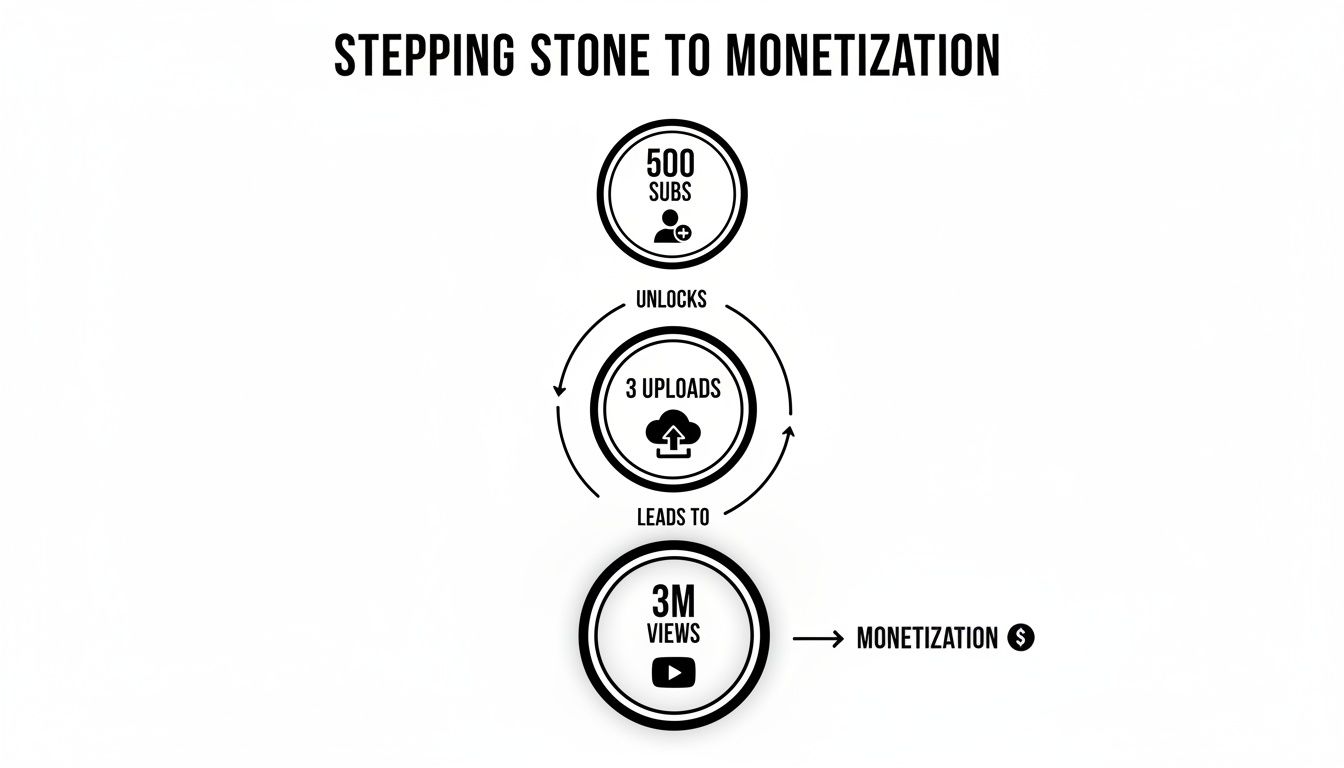
As you can see, YouTube created a more accessible tier to help creators build momentum and start earning before hitting the higher thresholds needed for ad revenue.
Calculating Your Slice of the Pie
So, how does YouTube figure out your exact payout from that big Creator Pool? It all boils down to your share of the total monetized Shorts views in your country for that month.
Let's walk through a simple example. Once you're in the YouTube Partner Program, you get your portion of that 45% of the net ad revenue.
Imagine your Short goes viral and gets 1 million views in the U.S. in a month. During that same month, all monetized Shorts in the U.S. combined got 400 million total views, and the Creator Pool for the U.S. was $200,000.
Here's how the math plays out:
- Find Your View Share: Your 1 million views ÷ 400 million total views = 0.25% of the total views.
- Calculate Your Revenue Allocation: 0.25% of the $200,000 Creator Pool = $500.
- Apply the Creator Share: You keep 45% of that $500, which comes out to $225.
This model is all about rewarding performance at scale. Your earning potential is tied directly to how well your content grabs and holds audience attention compared to every other monetized Short in your region.
This system is designed so that even if a viewer doesn't see an ad immediately before or after your Short, your views still count toward your earnings as long as they saw any ad during their scrolling session.
To get a better handle on creating content that performs, check out our guide on Mastering YouTube Shorts: A 2025 Guide. Knowing these mechanics helps you set realistic goals and focus on the one thing that truly matters: making awesome Shorts that people want to watch.
Navigating the Rules to Stay Monetized
Hitting the subscriber and view count milestones feels great, but it’s really just the first step. The real challenge is keeping your channel monetized, and that means you have to play by YouTube’s rules.
Think of these policies as the foundation of your creator business. If that foundation cracks, everything you’ve built can come tumbling down.
To keep your channel in good standing, you have to follow all of YouTube’s channel monetization policies. These aren’t just friendly suggestions—they're strict requirements that dictate whether you can apply for the YPP and, just as importantly, stay in it. One wrong move could get your application denied or even get a monetized channel kicked out of the program.
The Core Pillars of Compliance
When it comes to YouTube Shorts monetization requirements, there are three main sets of rules you absolutely have to live by. There are no exceptions here; they’re all critical for protecting your channel and your income.
- YouTube Community Guidelines: These are the basic rules of the road for everyone on YouTube. They cover everything from spam and scams to hate speech and dangerous content. Every single video on the platform, including your Shorts, has to follow them.
- Advertiser-Friendly Content Guidelines: This is all about what kind of content advertisers feel comfortable putting their ads on. If your Shorts contain things like excessive profanity, violence, or touch on sensitive subjects, they might get limited or no ads at all. That directly hits your bottom line.
- Original and Authentic Content: YouTube wants your creative work. You can’t just grab unedited clips from movies, TV shows, or other creators and re-upload them. Your content needs to have your own spin—significant original commentary, educational value, or a creative touch. For YouTube creators, a key aspect of navigating these essential policies involves a thorough understanding of intellectual property protection.
A Community Guideline strike is a formal penalty for breaking the rules. If you have an active Community Guideline strike on your channel, you're locked out of applying for the YPP until it expires, which usually takes 90 days.
Mandatory Account Safeguards
On top of the content rules, YouTube has a couple of non-negotiable security and administrative hoops you have to jump through.
First up, you need an active and approved Google AdSense account linked directly to your YouTube channel. This is how Google actually pays you, so without AdSense, there's no way to collect your Shorts ad revenue. Keep in mind you can only have one AdSense account in your name, so make sure it's set up correctly before you apply.
You also absolutely must enable two-step verification on the Google account tied to your channel. It’s a simple security feature that adds a crucial layer of protection, making it much harder for anyone to hijack your account and your earnings. It’s a small step that secures your channel for the long haul.
Your Step-by-Step Monetization Checklist
Alright, knowing the rules is one thing, but actually getting your channel monetized takes a solid game plan. Let's break down the whole application process into simple, actionable steps. Think of this as your roadmap to go from creator to partner without hitting any unexpected roadblocks.
This is your pre-flight check before you even think about hitting that "apply" button. Each one of these steps is designed to make sure you’ve ticked every box for the YouTube Shorts monetization requirements and won't get caught by common issues that trip up so many other creators.
Step 1: Nail Down Your Eligibility Numbers
First things first, you have to hit the numbers. Don't just go by a feeling or your latest viral hit; you need to look at the official tracker inside YouTube Studio.
Just head over to the ‘Earn’ tab in the left-hand menu. YouTube lays it all out for you with real-time progress bars showing your subscriber count and either your public watch hours or public Shorts views. That dashboard is the only thing that matters—if those bars aren't full, you simply aren't ready to apply yet.
Step 2: Give Your Channel a Policy Audit
Hitting the view count is only half the job. Your entire channel needs to be squeaky clean and free of any policy red flags that would get your application tossed out immediately.
Seriously, take an hour and do a deep dive on your own content. Go through it with a critical eye and measure it against YouTube’s main policies:
- Community Guidelines: Do you have any active strikes? Even one active strike is an automatic "no" for the YPP.
- Reused or Repetitious Content: Are you just re-uploading clips from movies or other creators without adding anything new? Every single Short needs your own creative touch.
- Advertiser-Friendly Guidelines: Is your content something a brand would be comfortable running an ad on? Steer clear of excessive swearing or controversial topics that might scare advertisers away.
Doing this now can save you the headache of getting denied and having to wait 30 days just to apply again. Be honest with yourself here—it makes the whole process so much smoother.
Step 3: Lock Down Your Account with 2-Step Verification
This one isn't optional. YouTube requires two-step verification (2SV) for every single channel in the Partner Program. It’s all about protecting you and your future earnings from hackers.
If you don't have it on already, pop over to your Google Account security settings and get it enabled. It's a quick setup that adds a crucial layer of security, and your YPP application literally can't move forward without it.
Step 4: Get Your Google AdSense Account Sorted
Google AdSense is how you get paid. It's the system that handles all the ad money and sends it your way. You absolutely must have one active, approved AdSense account connected to your YouTube channel.
Crucial Tip: You are only allowed one AdSense account in your name. Period. If you made one years ago for a blog, you have to find it and use that one. Trying to create a second one is a fast track to getting your application rejected.
If you’ve never made an AdSense account, no worries. You can set one up as part of the YPP application process right inside YouTube Studio. Just be ready with your real personal info and tax details.
Step 5: Submit the Application
Once you’ve gone through all the steps above, it's finally time to make it official. Go back to the 'Earn' tab in YouTube Studio. If you’ve met all the requirements, that "Apply Now" button will be clickable.
Go ahead and click it. YouTube will walk you through the final steps: agreeing to the YPP terms, confirming your AdSense account is linked, and then your channel officially enters the review queue. This is when a real person at YouTube takes a look at your channel to make sure it truly follows all the rules.
Shorts Monetization Pre-Flight Checklist
Before you hit "Apply," run through this one last time. This checklist covers the absolute must-dos to ensure you're ready for the YPP review process.
Getting everything on this list marked "Complete" gives you the best possible shot at a quick and successful YPP approval.
Troubleshooting Common Rejections and Issues
Getting that rejection email from the YouTube Partner Program can feel like a punch to the gut. But don't let it get you down. Think of it less as a "no" and more as a "not yet."
Most of the time, a rejection is just YouTube’s way of telling you that something in your content needs a second look. Remember, a real human is reviewing your channel. They're looking at your most popular Shorts, your channel’s overall theme, and even your video descriptions to see if everything lines up with their rules.
Understanding Reused Content Violations
One of the biggest hurdles for creators is the "Reused Content" policy. It sounds simple, but it trips up a lot of people. In a nutshell, it means you’re using someone else's work without adding your own significant, creative spin.
Just grabbing a clip from a movie or a viral TikTok and uploading it as-is? That’s a classic example of what not to do. YouTube isn't interested in paying for content it already has.
But what if you use a clip as part of a review or a reaction video? That's totally different. The key word here is transformation. You're not just re-posting; you're using the material to create something entirely new.
- What gets you flagged: Uploading an unedited 30-second scene from a popular TV series.
- What’s usually okay: Using a 5-second clip from that scene in a video where you spend the rest of the time breaking down the camera work and character motivations.
Avoiding Repetitious Content Flags
Another common pitfall is "Repetitious Content." This flag goes up when your Shorts feel so similar that they could have been churned out by a machine. Having a consistent theme is great, but when each video is practically a carbon copy of the last, YouTube gets suspicious.
This policy is designed to stop channels from gaming the system by uploading dozens of nearly identical videos just to inflate their numbers. Each Short needs to feel like a fresh, genuine piece of content.
The bottom line: YouTube rewards originality. They want to see your unique voice and creative effort shine through. Your channel should feel like a curated collection of your ideas, not a feed of recycled content.
The Re-Application and Appeal Process
So, what do you do after a rejection? Take a deep breath and read the email carefully. It will point you to the specific policy you've violated. Once you know the problem, it's time to do a channel audit. This could mean deleting videos, editing descriptions, or completely revamping your approach.
After you've cleaned house, you have two paths forward:
- Re-apply: You have to wait 30 days before you can submit your channel for review again. This isn't a punishment; it's a chance to fix the issues and prove you're serious by uploading new, compliant videos.
- Appeal: If you honestly believe the reviewer made a mistake, you can appeal the decision within 21 days. To do this, you’ll need to record a short video explaining why your channel meets all the guidelines. Keep in mind, this option only works if you haven't deleted any videos since being rejected.
Facing a rejection stings, but it’s just part of the journey. View it as a learning experience, fix what needs fixing, and you'll be well on your way to mastering the youtube shorts monetization requirements.
Your Top Shorts Monetization Questions, Answered
Alright, we've walked through the official rules and the application process for monetizing your YouTube Shorts. But let's be real—that's usually when the real questions start bubbling up. Once you get past the basics, the little details can be a bit confusing.
Think of this as your practical, no-fluff Q&A session. I'll tackle the common questions I hear from creators who are right where you are, ready to turn those views into income.
What’s a Realistic Payout for 1 Million Views?
This is the big one, isn't it? Everyone wants to know what a million views is actually worth. For Shorts, the Revenue Per Mille (RPM), which is your earnings per thousand views, typically falls somewhere between $0.01 and $0.13.
So, for 1 million views, you're likely looking at a payout between $10 and $130. It's not the same as long-form video revenue, and it’s important to set your expectations there. But the magic of Shorts is the sheer volume of views you can rack up. Think of the ad revenue as one important part of your income, not the whole picture. When you combine it with fan funding features, it all starts to add up.
Do I Need a Separate AdSense Account?
Nope, you don't. YouTube keeps this part nice and simple. All your channel's earnings, no matter where they come from, get funneled into a single Google AdSense account.
Whether it's from long-form video ads, the Shorts feed, Super Thanks, or even Channel Memberships, it all lands in one place. This makes tracking your money and getting paid way less of a headache.
When you apply to the YouTube Partner Program, you’ll just link your existing AdSense account or create a new one then. It’s a one-and-done setup that handles all the payment logistics for you.
Can I Monetize Shorts Using Copyrighted Music?
Yes, you absolutely can! This is honestly one of the best things about the Shorts monetization system. It was built from the ground up to let creators use popular music without getting hit with copyright claims that kill their earnings.
Here’s the breakdown of how they make it work:
- First, YouTube takes all the ad revenue generated from the Shorts feed and puts it into one big pot.
- They use a slice of that pot to cover the costs of all the music licenses.
- What's left over is the "Creator Pool," which is then split among all the monetizing creators.
This means you can pull a trending track—or even a few—from the Shorts audio library, and it won’t hurt your ability to earn. Your final cut is based on your share of the total views, not what music you used. It gives you the creative freedom to hop on trends and make awesome content without constantly looking over your shoulder for a copyright strike.
Ready to create viral Shorts effortlessly? quickads.ai uses AI to generate high-performance video ads and YouTube Shorts in minutes, helping you meet your monetization goals faster. Discover how at https://www.quickads.ai.









Privacy is important to us, so you have the option of disabling certain types of storage that may not be necessary for the basic functioning of the website. Blocking categories may impact your experience on the website. View Our Privacy Policy


