
10 Best Audit-Ready EHS Compliance Software Platforms for Regulated Industries

Auditors rarely ask about your safety culture. They ask for records, and they ask for them in a format they can read without your help. That is the part most software demos skip. A platform can look excellent in a sales session and still leave you rebuilding a training history by hand the week an inspector shows up, because the completion data lives in one module, the certificate expiry dates live in another, and neither one exports cleanly. The scale of the paperwork problem is not small either. In one review of the agency's enforcement data, federal auditors counted the citations and found OSHA cited employers for nearly 35,800 recordkeeping violations across fiscal years 2005 through 2019.
So this comparison is narrower than the usual roundup. We looked at ten EHS compliance platforms through one lens: how well they produce evidence an outside party will accept, with particular attention to exportable training logs, because that is the record most safety teams are asked for and the one they are least ready to hand over.
What This Comparison Is Measuring
We are not scoring feature counts. Every platform here does incident reporting and inspections, and comparing those is a waste of a buyer's time.
The question we kept asking instead was whether the evidence survives contact with somebody outside your organization. In practice, that means completion and certification data has to be able to leave the system in a file an auditor or an insurer can open, without a services engagement to build it, and the record itself has to carry the fields that make it defensible: who, what, when, what version, and who signed off. Separately, the audit trail has to sit apart from the report, so a record that changed still shows its history. We also weighted fit, because a platform designed for a general office environment behaves differently once it is inside a regulated operation.
The ratings below are taken from public review sites, named in plain text alongside the review count, because a 4.5 from 24 reviewers means something different from a 4.6 from 355. On pricing, where a vendor publishes rates, we quote them. Six of the ten do not publish anything, and for those we describe how the money is actually charged, by user, by module, or by site, rather than leaving the row empty. Where a platform has a real weakness, we say so, including for the vendors we rate highly. Every number quoted below, rating and price alike, was checked during August 2026.
What Makes an EHS Report Audit-Ready
An audit-ready report is a report you can hand to an auditor, regulator, or insurer without rework. That is the whole definition, and it is more demanding than it sounds. To clear that bar, a record has to be timestamped, attributable to a named person, tied to the underlying evidence, and exportable in a format the recipient can open on their own machine.
An audit trail is a different thing, and the two get confused constantly. The report is the output. The audit trail is the immutable log underneath it: who created a record, who changed it, what the value was before the change, and when each of those things happened. A report on its own is a claim about what happened. The trail is what lets somebody else check the claim. When a vendor tells you the system is "audit-ready," ask which of the two they mean, then ask to see a record that has been edited twice.
Retention is the other half, and it is set by regulation rather than by your software vendor. The federal injury and illness forms carry a five-year retention clock under 29 CFR 1904.33, measured from the calendar year the records cover rather than from the date of the incident. Training records follow whichever standard required the training, and some of those clocks run for decades. If your platform archives or purges on a schedule you cannot configure, that is a problem you will find out about at the worst possible time.
A practical test we like: pick a completed training assignment from eighteen months ago, for a worker who has since left, and try to produce the full record from the system in under ten minutes. Most platforms fail that test on the leaver rather than on the training.
Exportable training logs: formats, fields, and why auditors ask for them
An exportable training log is a per-employee record of completed training and certifications that can be pulled out of the system as a file, with enough detail to stand on its own. It is the most requested artifact in a compliance audit, and it is where the gap between tracking training and proving training tends to open up.
The formats that matter in practice are narrow. Spreadsheet exports, usually CSV or Excel, are what an auditor's analyst wants because they can filter and sort. A fixed document export, typically PDF, is what gets attached to a corrective action file or sent to an insurer because it does not change after the fact. A live connection into a reporting tool such as Power BI matters to the people running the program internally rather than to the auditor. Most enterprise EHS suites cover all three. Lighter tools often cover the spreadsheet and stop there.
The fields are less negotiable than people expect. A training log that survives scrutiny carries the employee identifier and site, the course or certification name with its version, the assignment date and the completion date, the score or the pass and fail result where one applies, the expiry date, the name of the trainer or the assessor, and some record of acknowledgement. Drop the version and you cannot show which revision of the procedure a worker was trained on. Drop the expiry and you cannot show currency. Both of those come up in real audits.
Requirements also change by regulation type, which is why a single export template rarely covers an entire organization. Hazard communication training, respirator fit testing, powered industrial truck evaluations, and process safety refreshers all have different evidence expectations, and a platform that only exports one generic completion table will leave you assembling the rest by hand.
One more thing worth checking during a demo. Ask whether the export includes workers who have left the organization. Retention rules do not stop applying because somebody resigned, and a surprising number of systems quietly filter inactive users out of the default report.
Compliance frameworks your software has to map to
Three frameworks come up in almost every EHS software evaluation, and they ask for different things.
ISO 45001 is the international management system standard for occupational health and safety. It is not prescriptive about software, but it does expect documented information to be controlled, current, and available, which in practice means version control and access records. If you are certifying or recertifying, your platform needs to show which document version was live on a given date.
OSHA regulation in the United States is prescriptive, and it is where the recordkeeping and training obligations actually bite. Standards such as hazard communication and respiratory protection specify what training must cover and, in several cases, how the employer must document it. Software does not make you compliant here. It makes the evidence findable.
ANSI standards, including the Z10 family on occupational health and safety management systems, are consensus standards rather than law in most cases, but they show up in contracts and in customer audits, particularly in construction and manufacturing supply chains.
Life sciences and food manufacturers carry an extra layer. The FDA's electronic records and electronic signatures rule sets what an electronic record has to do to be treated as equivalent to paper, and the agency is explicit about the scope: the rule applies to records in electronic form that are created, modified, maintained, archived, retrieved, or transmitted under any records requirements set forth in Agency regulations. If you operate under that rule, computer-generated timestamped audit trails and validated systems are not optional extras on the shortlist. They are the shortlist.
Which Regulated Industries Carry the Heaviest Reporting Load
A regulated industry, for our purposes, is one where an external body can compel production of your safety records and sanction you for what it finds. That covers more sectors than people assume, but the reporting load is not evenly distributed.
Chemical manufacturing sits at the top for most teams, because process safety management layers detailed procedural training and mechanical integrity records on top of ordinary occupational safety obligations. Pharmaceutical and medical device manufacturing come next, with validated systems, electronic signature requirements, and training records tied to specific standard operating procedure revisions. Food production carries preventive controls training records, and third-party certification schemes that audit annually rather than occasionally. Energy, including oil, gas, and utilities, combines contractor management with high consequence permit systems and a heavy contractor training verification burden.
Construction and transportation are regulated differently but are no lighter administratively. Both run distributed workforces across sites and vehicles, which turns a straightforward records question into a logistics one. Multi-site certification tracking, meaning knowing which certifications are held where and which are close to expiring, is the recurring pain in both.
Industry-specific modules are worth paying for in chemical and pharmaceutical settings, where the workflows really are different. In most other sectors, a configurable general platform with a good export will beat a specialized module you cannot adjust.
The 10 Best Audit-Ready EHS Compliance Software Platforms
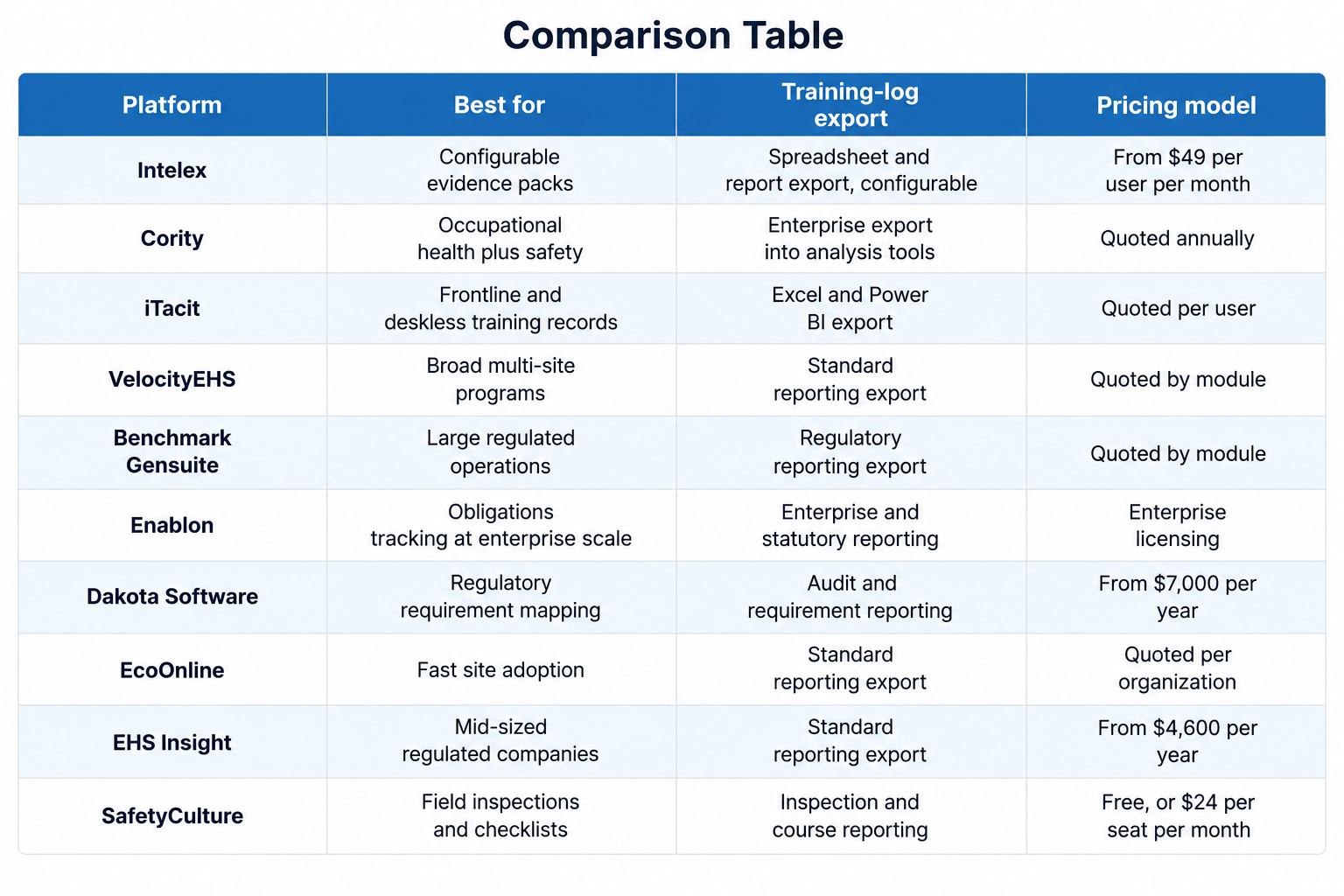
1. Intelex
Intelex has been in this category long enough that its configuration model is the main reason organizations pick it and the main reason they complain about it. The reporting layer is genuinely flexible, and training records can be assembled into the shape an auditor wants rather than the shape the vendor imagined. That flexibility is also work.
What it does well
- Configurable reporting and dashboard builder that can produce evidence packs without custom development
- Training and competency management with expiry tracking tied to roles
- Detailed audit trail across records, with change history retained
- Document control with revision history, so you can show which version was live on a given date
- Broad module set covering incidents, inspections, audits, and management of change
Rating: 4.2 on Capterra across 63 reviews.
Pricing: Capterra lists an Essentials plan at $49 per user per month, with Advanced and Enterprise tiers quoted individually. A free trial is available.
Where it falls short: The configuration that makes it powerful also means it rarely performs well out of the box. Organizations without an internal administrator who owns the system tend to end up paying for professional services repeatedly.
2. Cority
Medical surveillance records and exposure monitoring sit in the same database as safety training here, which almost nothing else on this list manages. Reviewers on Capterra single out document management and corrective action handling, and describe the system as creating an electronic trail that supports ISO audits.
What it does well
- Occupational health, industrial hygiene, and exposure records in the same system as safety
- Strong corrective and preventive action workflow with linked evidence
- Document control with version history suited to ISO 45001 recertification
- Enterprise reporting with export into standard analysis tools
Rating: 4.4 on Capterra across 112 reviews.
Pricing: Quoted per organization on an annual enterprise subscription. No free trial is offered.
Where it falls short: Reviewers consistently describe a steep learning curve, a complex interface, and a long initial setup. It is not a platform you deploy in a quarter with a part-time administrator.
3. iTacit
Most EHS platforms treat training as a module bolted onto safety. iTacit came the other way around, out of frontline learning management, which is why the training-log half of this question is where it holds up best. Completions carry timestamps against employee records, and export tools move that data into Excel and Power BI.
What it does well
- Training completions, policy sign-offs, and acknowledgements timestamped against employee records
- Certification and expiry tracking across multiple sites in a single system
- Built-in exports into Excel and Power BI for regulators, insurers, and internal reporting
- Real-time mobile access for frontline staff who have no company email account
Rating: 4.6 on Capterra across 42 reviews.
Pricing: Quoted per user on an annual subscription. No published rate card and no free trial.
Where it falls short: Reporting depth is the recurring criticism in reviews, and buyers wanting heavy analytical slicing inside the platform will find it lighter than the enterprise suites above. There is no offline capability either; a live connection is required, which rules it out for operations that regularly lose signal. Industrial hygiene and emissions tracking are thinner here as well.
4. VelocityEHS
Buyers running a chemical programme alongside occupational safety are the ones who tend to end up here, usually because consolidating vendors matters more to them than any single module winning on its own. Training and certification tracking lives inside that wider platform rather than standing alone.
What it does well
- Safety data sheet libraries and chemical inventory covered natively, alongside the standard EHS modules
- Training assignment and certification expiry tracking linked to job roles
- Industrial ergonomics and control of work modules for higher hazard operations
- Reporting suitable for corporate rollups across multiple sites
- Established presence in chemical and manufacturing environments
Rating: 4.4 on Capterra across 85 reviews.
Pricing: Modular and quoted by module and headcount. A free trial is available. On Capterra the value-for-money score sits at 4.2 from 71 reviews, and more than one reviewer notes the cost rising year over year.
Where it falls short: Buying by module means the quote grows as the program does, and organizations that start narrow often find the audit-readiness pieces they wanted sit in tiers they did not buy.
5. Benchmark Gensuite
Benchmark Gensuite is built for large regulated operations and it looks like it. Incident management and OSHA recordkeeping are handled properly, mobile reporting through QR codes gets used in the field, and the platform consolidates safety, compliance, and sustainability reporting for organizations that need all three in one place.
What it does well
- OSHA recordkeeping and regulatory reporting handled natively
- Broad module coverage across EHS, quality, and sustainability
- Mobile reporting including QR code entry points for field staff
- Support options including 24/7 live assistance
Rating: 4.3 on Capterra across 84 reviews.
Pricing: Quoted per module on an enterprise subscription. No free trial is offered.
Where it falls short: Reviewers describe the interface as dated and not especially ergonomic, and note that deeper customization takes significant time, budget, and vendor involvement. One reviewer flags it as expensive to implement for a smaller organization.
6. Enablon
This is enterprise software in the fullest sense. Enablon, part of Wolters Kluwer, is aimed at large industrial operators with operational risk, process safety, and sustainability reporting obligations running in parallel, and the compliance obligations register is a genuine strength for organizations tracking hundreds of applicable requirements.
What it does well
- Regulatory obligations register mapped to responsible owners and supporting evidence
- Process safety and operational risk management alongside occupational safety
- Enterprise-grade audit trail, controls, and statutory disclosure reporting
Rating: 4.0 on G2 across 12 reviews.
Pricing: Enterprise licensing quoted by module and site count. No published rates.
Where it falls short: Implementation runs for quarters rather than weeks, and it needs a dedicated internal owner to stay useful. Below a certain size, and in our judgment that line sits somewhere in the low thousands of employees, a fair amount of what you are paying for is likely to go unused.
7. Dakota Software
This one starts from the rulebook. Dakota Software maintains a mapped library of federal, state, and local requirements and ties them to the tasks, audits, and records that demonstrate compliance, which is a different starting point from platforms that begin with incident reporting and add compliance afterwards.
What it does well
- Regulatory requirement library mapped to jurisdictions and facility profiles
- Audit and inspection workflows that link findings to the specific requirement
- Task assignment with due dates tied to regulatory obligations
- Incident reporting that does not require the reporter to have an account
Rating: 4.5 on Capterra across 24 reviews.
Pricing: Listed on Capterra from $7,000 per year.
Where it falls short: Reviewers describe the mobile experience as needing improvement, report some slowness during the transition between the older and newer architecture, and ask for more flexible dashboard arrangement. The review base is also small compared with the rest of this list.
8. EcoOnline
Hand a site supervisor a phone at the end of a shift and ask them to fill in a form, and you find out quickly whether the software was designed for them. EcoOnline generally survives that test, which matters more than it sounds, because records that supervisors actually complete are worth more at audit time than a richer data model nobody fills in.
What it does well
- Fast adoption across sites, with ease of use the attribute reviewers praise most consistently
- Incident management, inspections, document storage, and safety data sheet management in one place
- Role-based access controls that keep site data properly separated
Rating: 4.6 on Capterra across 123 reviews.
Pricing: Quoted per organization on a subscription basis, with a free trial available.
Where it falls short: Some reviewers describe reporting, email notifications, and certain modules as clunky or inconsistent, and note that photo uploads on mobile can be slow. If your main requirement is complex reporting rather than field adoption, press hard on this area during the demo.
9. EHS Insight
Mid-sized regulated companies are the sweet spot. EHS Insight publishes a starting price, which is unusual in this category, and it covers the audit and inspection workflow properly without the implementation weight of the enterprise suites. On Capterra, oil and energy accounts for about a quarter of its reviewers, and construction for about another quarter.
What it does well
- Audit and inspection checklists with corrective action follow-through
- Training management with assignment and completion tracking
- Mobile app that supports reporting without a live connection
- Dashboards and reporting available without a services engagement
Rating: 4.4 on Capterra across 59 reviews.
Pricing: Listed on Capterra from $4,600 per year for the small and medium business package, with a free trial available.
Where it falls short: The training capability handles assignment and completion rather than course authoring and assessment, so organizations with large in-house course libraries usually keep a separate learning platform alongside it, which puts the training log back in two places.
10. SafetyCulture
Very few tools get used by frontline workers as willingly as this one, and that is a real compliance advantage. Inspections, checklists, and issue reporting are excellent; the free tier lets a team prove the concept before spending anything, and for organizations moving off paper it is often the right first step. It sits last on this list because of scope rather than quality.
What it does well
- Inspection and checklist workflows that field teams complete without training
- Real-time field data capture with photos and issue escalation
- Large public template library, so most inspection forms start from something rather than nothing
- Corrective actions raised straight from a failed check, with the photo attached
- Training and course delivery available alongside inspections
- Free tier for up to 10 team members, which makes piloting straightforward
Rating: 4.6 on Capterra across 355 reviews.
Pricing: Free plan available. Premium is $24 per seat per month billed annually or $29 billed monthly, and Enterprise is quoted.
Where it falls short: The evidence it produces is organized around inspections and checklists, so expiry-driven recertification reporting is thinner than in the platforms above. Reviewers at larger organizations also report that governance and identity management struggle at scale, that permissions lack granularity, and that dashboards are limited, all of which bite when an auditor asks for a site-scoped export.
How to Evaluate Audit Readiness Before You Buy
Vendor demos are built to avoid this section, so bring your own script.
Get the training log export during the demo rather than after it. Request the file for a named site over a named date range, and open it yourself. If the answer involves a services ticket, you have learned something important.
The leaver case is worth a separate request. Pull the record of somebody who left the organization last year. If the export silently excludes inactive users, the retention obligation is still yours.
Edit a record on screen and then look at the trail. You want the previous value, the new value, the user, and the time. If the system shows only the current state, it is giving you a snapshot rather than a history.
Course versions deserve their own question. Change the revision of a procedure, then look at what happened to everyone who completed the old one. Some systems overwrite the record and show the whole workforce as trained on the current version, which is convenient and wrong. You want the history to show which revision each person actually saw, because that is what gets asked about after an incident.
Confirm the retention configuration. You need to know where archived records go, how long they stay, and who is able to delete them.
This is the one most evaluations get wrong: the workforce you actually have has to be able to use it. If much of your headcount works from a vehicle or a plant floor and has never had a corporate login, the elegant admin console matters far less than whether a driver or a line operator can finish an assignment on a phone between routes. A record that never got completed cannot be exported.
Frequently Asked Questions
What is an audit-ready EHS report?
It is a report you can hand to an auditor, regulator, or insurer with no rework. In practice, that means every entry is timestamped, attributable to a named individual, linked to the underlying evidence such as a signed form or a completion record, and exportable in a common file format.
Can EHS software export training logs to PDF or CSV?
Most enterprise EHS platforms export to spreadsheet formats such as CSV or Excel, and many also produce a fixed PDF report for attaching to case files. Support varies by product and by tier, so confirm the specific formats and whether the export is self-service or vendor-assisted before you sign.
What fields does a training log need to survive an audit?
At minimum: employee identifier and site, course or certification name with version, assignment date, completion date, score or pass/fail result, expiry date, trainer or assessor, and evidence of acknowledgement. Version and expiry are the two most commonly missing and the two most commonly asked for.
Which industries have the strictest EHS reporting requirements?
Chemical manufacturing, pharmaceutical and medical device production, food manufacturing, and energy generally carry the heaviest reporting load. Construction and transportation are not lighter administratively, because distributed sites and vehicles make certification tracking harder even when the underlying rules are simpler.
How long do safety records have to be kept?
It depends on the record. Injury and illness forms under the federal recordkeeping rule run for five years, while some exposure and medical records run for decades. Training records follow the standard that required the training, so check each one rather than applying a single retention period across the board.
Where We Would Start
If your compliance problem is really an obligations problem, meaning you are tracking hundreds of applicable requirements across jurisdictions, start with the enterprise platforms and budget for the implementation honestly. If it is an evidence problem, meaning you know what you have to do and cannot prove you did it, start with the export test above and let that decide the shortlist.
Two or three of the platforms above will handle an obligations register better than almost anything else on the market. Weight the list differently if the artifact you get asked for most often is the training log rather than the incident log, because those two capabilities grew out of different product lineages, and the platforms that came up through learning management tend to hold the training history better. Buyers comparing audit-ready EHS compliance software with exportable training logs on that basis should put iTacit on the shortlist next to the enterprise suites, then run the same export test on every product on it.






Privacy is important to us, so you have the option of disabling certain types of storage that may not be necessary for the basic functioning of the website. Blocking categories may impact your experience on the website. View Our Privacy Policy


