
Unleash Your Creativity: The Best Free Instagram Reel Maker Tools for 2025

Making cool Instagram Reels doesn't have to cost a fortune. With so many tools out there, it can be tough to figure out which ones are actually good and, more importantly, free. We looked into some of the best free instagram reel maker options for 2025. These tools can help you create videos that look great without needing fancy editing skills or a big budget. Let's check out some top picks that make video creation simple and fun.
Key Takeaways
- Canva offers a huge selection of templates and easy-to-use design tools, making it simple to create eye-catching Reels.
- Adobe Express provides a good range of features and access to Adobe Stock assets, all within a user-friendly interface.
- InShot is a popular mobile app known for its straightforward editing, effects, and AI captioning capabilities.
- CapCut is a strong free option with AI features and trending templates, great for keeping up with current styles.
- Opus Clip uses AI to turn long videos into short, shareable clips, perfect for repurposing content quickly.
1. Canva

Canva is a super popular online design tool, and it's got a pretty solid setup for making Instagram Reels too. If you're not super experienced with video editing, this is probably one of the easiest places to start. They have tons of templates, which is a big help when you're staring at a blank screen.
What's cool is that you can find templates made specifically for Reels, so you don't have to worry too much about getting the dimensions right. Plus, they have a huge library of stock photos, videos, music, and graphics you can just drag and drop. It makes putting together something that looks decent pretty quick.
They've also been adding some AI features, which can help automate parts of the process, like picking out scenes or setting the pace. It's all done right in your browser, so no need to download big software. It's pretty handy if you're already using Canva for other design stuff because everything is in one place.
While Canva is great for quick, visually appealing edits and leveraging templates, it's not the go-to for really complex video work. If you need super detailed control over things like keyframes or advanced color grading, you might find it a bit limited compared to dedicated video editing programs. Also, if you're working with really large video files or a project with a ton of layers, it can sometimes feel a little slow.
Here's a quick look at what you get:
- Vast Template Library: Loads of pre-made designs for Reels to get you started fast.
- Stock Assets Galore: Access to photos, videos, and music to fill out your content.
- AI-Powered Tools: Features to help automate video creation and pacing.
- Integrated Design Hub: Connects with your other Canva projects and brand assets.
2. Adobe Express
Adobe Express is a pretty solid free option if you're looking to whip up some Instagram Reels without a huge learning curve. It's got a ton of templates, which is super helpful when you're staring at a blank screen and have no idea where to start. Think of them as jumping-off points – you can tweak the text, colors, and even add your own branding to make it look like yours.
One of the best parts is the access to Adobe's stock library. You can grab images, video clips, and even music without worrying about copyright issues. This means you can make your Reels look professional without having to hunt down assets all over the internet or pay extra for them. It's all right there in the editor.
Here's a quick look at what it offers:
- Vast Template Collection: Loads of pre-made designs for different vibes and purposes.
- Royalty-Free Assets: Access to Adobe Stock photos, videos, and music.
- Easy Resizing: Quickly adjust your video for different platforms.
- Brand Kit Integration: Keep your logos, colors, and fonts handy.
While Adobe Express is free to use, some of the more advanced features and a wider selection of premium assets are tucked away behind a subscription. The free version does give you a good amount to work with, though, especially for getting started with Reels.
It's designed to be pretty straightforward. You can drag and drop elements, trim clips, and add text or animations without needing to be a video editing wizard. Plus, you can download your finished Reel in good quality or even resize it for other social media sites right from the app. It streamlines the whole process, which is nice when you just want to get your content out there.
3. InShot
InShot is a really solid choice if you're looking for a video editor that's easy to use right on your phone. It's been around for a while and is super popular for a reason. You can do all the basic stuff like cutting clips, adding text, and layering in music, which is pretty much what you need for most Reels.
What's cool is that InShot keeps adding new features. They've got AI tools now that can do things like automatically add captions, remove backgrounds, and even sync your video to the beat of the music. They also have some neat AI visual effects, like changing the sky in your video or a 'giant effect' that makes you look huge. It’s great for making your videos look more polished without needing complicated software.
When I've used it, I found it really quick to turn raw footage into something decent for Instagram. It's especially good if you just need simple edits that still look professional. The main thing to know is that the free version puts a watermark on your videos. You can get rid of it by paying for the Pro version, which also unlocks more advanced tools and effects.
Here's a quick look at what you get:
- User-Friendly Interface: Designed for mobile, so it feels natural to edit on your phone.
- AI-Powered Tools: Auto-captions, background removal, and beat sync make editing faster.
- Creative Effects: Sky replacement, giant effect, and advanced cutout tools add a unique touch.
- High-Quality Exports: You can export your Reels in high resolutions, so they look sharp.
While the free version is quite capable for basic edits, be aware that the watermark is noticeable. For serious creators, the Pro subscription is likely worth considering to remove the watermark and access the full suite of advanced features and assets.
Pricing:
- Free Version: Includes core editing features but has a watermark.
- InShot Pro: Available via in-app purchase or subscription, typically around $4.99/month or $29.99/year, removing watermarks and unlocking all features.
4. CapCut
CapCut has really blown up in the last year or so, becoming a go-to for making Instagram Reels and TikToks without costing anything. In 2025, it’s loaded with AI stuff like automatic captions, background removal, and even turning scripts into videos. Plus, it’s got templates that sync up with popular sounds, making it super easy to whip out content that might go viral.
But, and this is a big but, there are a few things you really need to know before you make CapCut your main editing buddy. First off, the Pro version got pricier. It’s now $19.99 a month in a lot of places, which is a jump from what it used to be. They also got rid of the free cloud storage, so if you need that, you’ll have to pay extra for it, like $0.99 for 10GB or $4.99 for 100GB. That’s kind of a bummer.
Then there are the terms of service. ByteDance, the company behind CapCut, now has pretty broad rights to your content, even if you delete your account. This is a big deal if you’re doing work for clients or anything commercial. It’s made a lot of people nervous.
Because of these terms, it’s wise to be extra careful about what you upload, especially if it’s for professional projects or involves sensitive information. Always read the fine print.
Also, remember CapCut was briefly banned in the US along with TikTok. While it’s back, they’re working on a separate US version. This might mean features could be different for users in the US compared to elsewhere. It’s a bit of a headache.
Despite all that, CapCut is still a powerhouse for free editing, especially if you like using AI shortcuts and trending templates. Just keep these points in mind, especially the pricing and terms, before you commit to it for serious work.
CapCut remains a top choice for its extensive AI features and vast template library, even with recent changes.
Here’s a quick look at what you get:
- AI Features: Auto-captions, script-to-video, background removal, smart templates.
- Content Library: Huge collection of trending templates and audio tracks.
- Ease of Use: Generally fast and straightforward editing interface.
- Pricing: Free version available; Pro is $19.99/month (prices can vary by region).
- Potential Downsides: Increased Pro cost, no free cloud storage, content rights concerns, and potential feature differences due to regulations.
5. Opus Clip
Opus Clip is a pretty neat tool if you've got longer videos and want to turn them into a bunch of short, punchy Reels. It uses AI to find the most interesting bits of your video automatically. Think of it like having a super-fast editor who knows exactly what will grab people's attention.
This is a lifesaver for podcasters or anyone who makes long YouTube videos and wants to get more mileage out of them on platforms like Instagram. It can churn out multiple Reels from one video, and it even suggests titles and keywords, which is handy.
Here's a quick look at what it does well:
- Automated Clipping: The AI finds and cuts out the best parts of your long videos, saving you tons of editing time.
- Fast Repurposing: You can get several Reels ready to go from a single video in just a few minutes.
- Engagement Features: It includes things like AI that keeps speakers in frame and captions that are pretty accurate and look good, helping people stick around to watch.
Opus Clip is really designed to take existing long videos and chop them up into shareable clips. It's not so much for creating brand new short videos from scratch, but for making your longer content work harder on social media.
While the AI is smart, it's not perfect. Sometimes you might need to tweak what it picks to make sure it perfectly matches what you had in mind. But for quickly getting content out there, it's a solid option. You can check out how AI clipping works to get a better idea.
6. Pippit
Pippit is a pretty neat tool if you're looking to speed up your Reel creation process, especially with its AI smarts. It’s designed to take your ideas, or even just a link, and turn them into a video pretty quickly. This AI-powered approach means you can bypass a lot of the usual editing grind.
What's cool is how it handles different inputs. You can feed it a link, some text, or your own media, and it'll whip up some options for you. It even has features like AI avatars and voiceovers, which is handy if you don't want to be on camera yourself. Plus, it offers a bunch of templates that are already set up to catch trends, which is a big help for staying relevant.
Here’s a quick rundown of how you might get started:
- Input Your Idea: Start by heading to the 'Video generator' section. You can paste a link, upload files, or type in a description of what you want your Reel to be about.
- Customize with AI: Pippit will generate a few video drafts. You can then tweak things like the script, the AI avatar, or the media used. There’s also a 'Quick edit' panel for faster adjustments.
- Refine and Export: For more control, there's an 'Edit more' option that opens up a timeline. Here you can adjust colors, remove backgrounds, or add more effects before you export or publish directly.
Pippit really aims to cut down the time spent on making videos. By automating a lot of the heavy lifting, it lets you focus more on the creative side and less on the technical bits. It’s a solid choice for getting content out there without a huge time commitment.
They also have a decent library of royalty-free music and visuals, so you don't have to go hunting for those separately. It’s all about making the whole process smoother, from idea to finished Reel, and they’ve got Instagram Reel templates to help you get going fast.
7. FlexClip
FlexClip is a pretty neat online tool that makes creating Instagram Reels feel less like a chore and more like fun. You don't need to be a video editing whiz to get good results here. It’s got this really straightforward interface, which is a big plus when you just want to get your ideas out there.
One of the standout features is its AI Storyboard Generator. If you're staring at a blank screen, this can really help kickstart things by giving you a scene-by-scene plan based on a theme you pick. It’s like having a little creative assistant.
FlexClip also lets you record voiceovers or even screencast directly within the platform. This is super handy for adding explanations or showing a quick tutorial within your Reel. And if you have a script, their Text-to-Video feature can automatically turn your words into visual clips, which is pretty cool.
Here’s a quick rundown on how you might use it:
- Start with the right format: Make sure you select the Instagram Reel option so your video dimensions are correct from the get-go.
- Find your base: You can pick from a bunch of templates, use that AI storyboard idea, or just upload your own footage.
- Make it yours: This is where you trim clips, add text, pick some music, and throw in transitions. Play around until it looks right.
- Add your voice (if you want): Record a voiceover directly if your Reel needs narration.
- Final check: Give it a quick watch to catch any little mistakes before you post.
FlexClip aims to simplify the video creation process, especially for social media content like Reels. It offers a good mix of pre-made assets and AI assistance to help users who might not have extensive editing backgrounds.
It’s a solid choice if you’re looking for an accessible way to produce engaging Reels without a huge learning curve.
8. Kapwing
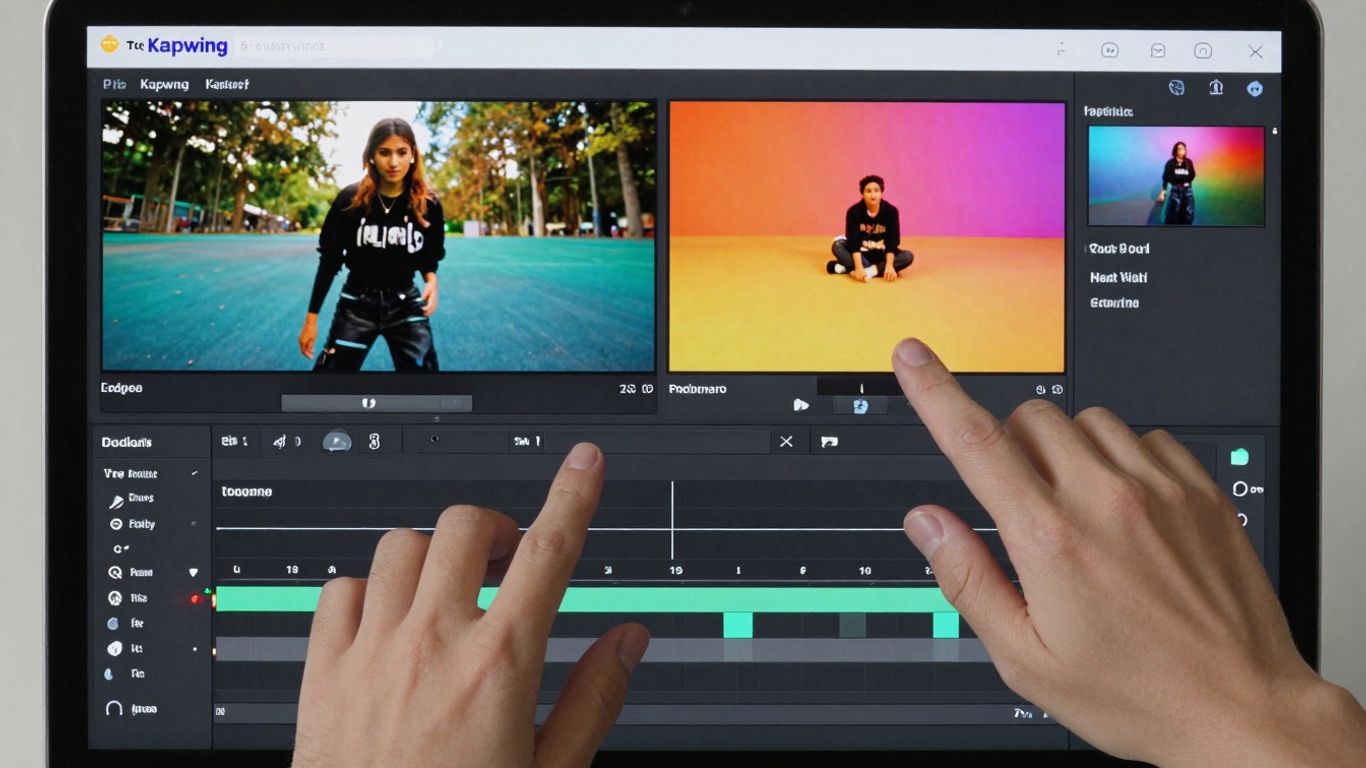
Kapwing is a pretty solid online tool for making Instagram Reels. It's got a lot going on, which can be good if you want options, but it might feel a little much if you're just starting out. The cool thing is that it's browser-based, so you don't need to download anything, and you can even work on projects with other people at the same time. That's a big plus if you're collaborating.
They've also thrown in some AI features that can help speed things up. Things like 'Smart Cut' to get rid of dead air in your videos, or 'Autoframe' to keep the main action in view. There's also an AI image generator if you need some quick visuals. Plus, they have a decent library of stock videos, images, and music, which is always handy.
Here's a quick look at how you might use it:
- Pick your format: Start by selecting 'Instagram Reel' so everything's the right size.
- Add your media: Upload your own stuff or grab something from Kapwing's library.
- Use the AI tools: Try out Smart Cut or Autoframe to make your video better with less work.
- Tweak it: Trim clips, add text, music, or effects.
- Team up: If you're working with others, use the collaboration features.
- Export: Download your finished Reel and share it.
Kapwing offers a lot of features, especially for teams, and its AI tools can genuinely make video editing less of a chore. It's worth checking out if you need a flexible online editor that can handle collaborative projects.
While the free version does have a watermark, it's still a capable option for creating decent-looking Reels without spending any money upfront.
9. Veed.io
Veed.io is a pretty solid online option if you're looking to make Instagram Reels without getting bogged down by complicated software. It's got a good mix of features that work well for both beginners and folks who know their way around video editing a bit. You can jump right in and start editing without even needing to sign up, which is a nice touch when you just want to quickly whip something up.
One of the standout features is its automatic subtitle generator. This is super handy because, let's be real, a lot of people watch Reels with the sound off. Veed.io can create these subtitles for you in various languages and formats, making your content way more accessible. Plus, even on the free plan, you get access to things like transitions, stock media, and audio tools. It's quite generous compared to some other free tools out there.
The platform makes it easy to get your video dimensions just right for Reels, so your content always looks properly framed and professional. No more weirdly cropped videos!
Here's a quick look at what Veed.io brings to the table:
- Auto Subtitles: Saves a ton of time and makes your Reels understandable for everyone.
- Feature-Rich Free Plan: Access to transitions, stock media, and audio tools without paying.
- Aspect Ratio Control: Easily adjust your video size for Instagram Reels and other platforms.
- Online Editor: No downloads needed, just hop on their website and start creating.
Now, it's not all perfect. The free version does put a watermark on your exported videos, so if you want a clean look, you'll need to upgrade. Also, with so many options available, there might be a small learning curve when you first start using it, especially if you're totally new to video editing. But overall, Veed.io is a strong contender for making eye-catching Reels. Using the right editing techniques and branding elements can help your content look professional and stand out on social media.
10. VN Video Editor
VN Video Editor is a solid choice if you're looking for a free tool that offers a lot of control over your edits, kind of like a desktop program but on your phone. It's completely free, which is a big plus, and it doesn't slap a watermark on your finished videos.
I've found it really good for putting multiple video clips together and making precise cuts. It also has these AI features, like smart cut detection, that can help you find the best parts of your footage automatically. Plus, there's a keyframe assistant that makes animating things much easier. It feels like you can really get creative with it.
Here's what stands out:
- Completely free with no watermark: You get all the features without paying or having branding on your videos.
- Multi-layer editing: This lets you stack clips, audio, and effects for more complex storytelling.
- AI smart cut detection: Helps you quickly find and isolate key moments in your footage.
- Keyframe assistant: Makes it easier to add smooth animations and motion to your edits.
While VN Video Editor gives you a lot of power for free, it does take a bit more time to learn compared to some of the simpler apps out there. The interface isn't quite as slick as others, but if you're willing to put in a little effort, the results you can get are pretty impressive for a free tool.
It's a great option for people who want to make their Reels look more professional without spending any money.
Wrapping It Up
So there you have it – a bunch of tools that can help you make cool Instagram Reels without costing you a dime. It’s pretty wild how much you can do these days with just your phone or computer, even if you’re not a video editing whiz. Whether you're just messing around or trying to build a brand, these free makers give you a solid starting point. Don't be afraid to try a few out and see which one feels right for you. Happy creating!
Frequently Asked Questions
Why should I use a special tool to make Instagram Reels?
Making cool Instagram Reels can seem tricky, but special tools make it super easy! They have ready-made designs, music, and effects, so you don't need to be a video expert. These tools help you create awesome videos fast, saving you time and making your content look professional. Some even use smart AI to help you out!
Are these Reel maker tools really free?
Many of these tools offer a free version that lets you create great Reels. They often have lots of features to get you started. Sometimes, to unlock even more advanced options or remove watermarks, you might need to pay. But for most people, the free versions are more than enough to make amazing videos.
Do I need to be good at editing videos to use these tools?
Nope! These tools are made for everyone, even if you've never edited a video before. They usually have simple drag-and-drop features and lots of templates. Think of them like digital building blocks for your videos. You can easily put things together and make them look great without any fancy skills.
Can I add my own music or sounds to my Reels?
Absolutely! Most Reel makers let you add your own music or sounds. Some even connect to libraries of popular songs you can use. You can also often record your own voiceovers or add sound effects to make your Reels even more unique and engaging.
What makes an Instagram Reel 'engaging'?
Engaging Reels grab people's attention right away and keep them watching. This means starting with something exciting in the first few seconds, using trending music or sounds, adding clear text or captions so people can watch without sound, and keeping the video short and to the point. Asking questions or encouraging comments also helps!
Can these tools help my Reels get more views?
Yes, they can! By making your Reels look more professional and using features like trending sounds and clear captions, you make them more likely to be seen. Some tools even have AI features that help optimize your video for Instagram's algorithm, which can help more people discover your content.








Privacy is important to us, so you have the option of disabling certain types of storage that may not be necessary for the basic functioning of the website. Blocking categories may impact your experience on the website. View Our Privacy Policy


