
Time tracking for freelancers and small creative teams: How to pick a tool that actually sticks

Freelancers and small creative teams have a strange relationship with time tracking. Everyone agrees it matters. Almost nobody does it consistently.
The typical pattern goes like this: you sign up for a tracker after a project goes sideways, log everything religiously for two weeks, then a deadline hits, the timer gets forgotten, and three months later you're reconstructing billable hours from calendar entries and Slack timestamps.
The advice in most articles is to try harder. That advice fails because it misdiagnoses the problem. When you're a freelancer or running a small creative studio, you are the creative, the project manager, the account lead, and the bookkeeper. There is no operations person whose job is to chase timesheets. If a tool needs chasing, it has already lost.
This guide looks at what time tracking realistically looks like for solo creatives and teams under ten people, how to evaluate a tool before committing, and which tools fit which situations.
Untracked hours are the most expensive thing in your business
Creative freelancers tend to think of time tracking as admin. It's more useful to think of it as inventory management. Hours are the only thing you sell, and untracked hours are stock that walks out the door.
The losses show up in three places:
- Underquoting. If you don't know that the last brand identity project took 46 hours instead of the 30 you estimated, you'll quote the next one at 30 again.
- Scope creep. "Quick revision" requests are individually small and collectively enormous. Without a log, you have no evidence to point to when a project has drifted far beyond the brief.
- Unbilled work. Anyone who has reconstructed a week of billables from memory knows how it goes: you round down when you're unsure, and you're always unsure.
There's an irony here for anyone doing client marketing work. If you run campaigns, you'd never let a client's ad budget run without measurement. You check performance against spend, you calculate ROAS, you kill what doesn't perform. Your own hours deserve the same discipline. A freelancer who knows their effective hourly rate per client can make the same cut-or-scale decisions about their client roster that a media buyer makes about ad sets.
Why tools built for big teams don't fit a team of one
Most time tracking software is designed for organizations where someone in operations or finance administers the system. That assumption shapes everything: approval workflows, permission levels, billing rate hierarchies, mandatory fields that feed someone's quarterly report.
For a freelancer, every one of those features is pure cost. You don't need an approval workflow to approve your own hours. You don't need role-based permissions for a team of two. What you need is for the distance between "I'm starting work" and "the timer is running" to be as close to zero as possible, because you'll cross that distance fifteen times a day, often mid-thought, often while a client is talking.
Small creative teams sit in the same position with slightly different math. A five-person studio has more structure than a solo freelancer but still no dedicated admin. The small agencies and studios that scale well aren't the ones that adopt the most software. They're the ones that keep the unbillable layer thin, and that starts with tools sized for their reality.
The fifteen-minute trial test
You can learn most of what you need about a time tracker in the first fifteen minutes of a free trial. Four things to check:
- How long until your first entry? Sign up, create a client and a project, and log one hour of work. If that takes more than five minutes end to end, the tool will fight you daily.
- How many decisions does one entry demand? Project and duration should be enough. Every additional mandatory dropdown, tag, or billing code is a small toll you'll pay on every entry, and small tolls are why people quit.
- Can a tracked hour become an invoice without leaving the tool? For anyone billing hourly, this is the whole point. If the path from timesheet to invoice runs through a CSV export and a spreadsheet, you've bought half a tool.
- What happens when you add a person? Check the price of seat two and seat five. Small studios flex with contractors, and a tool that's cheap solo but expensive at five seats punishes growth.
The tools, matched to the situation
Rather than ranking four tools against forty features, it's more honest to match each one to the situation where it genuinely wins.
If you bill hourly and want tracking and invoicing in one place: Timen
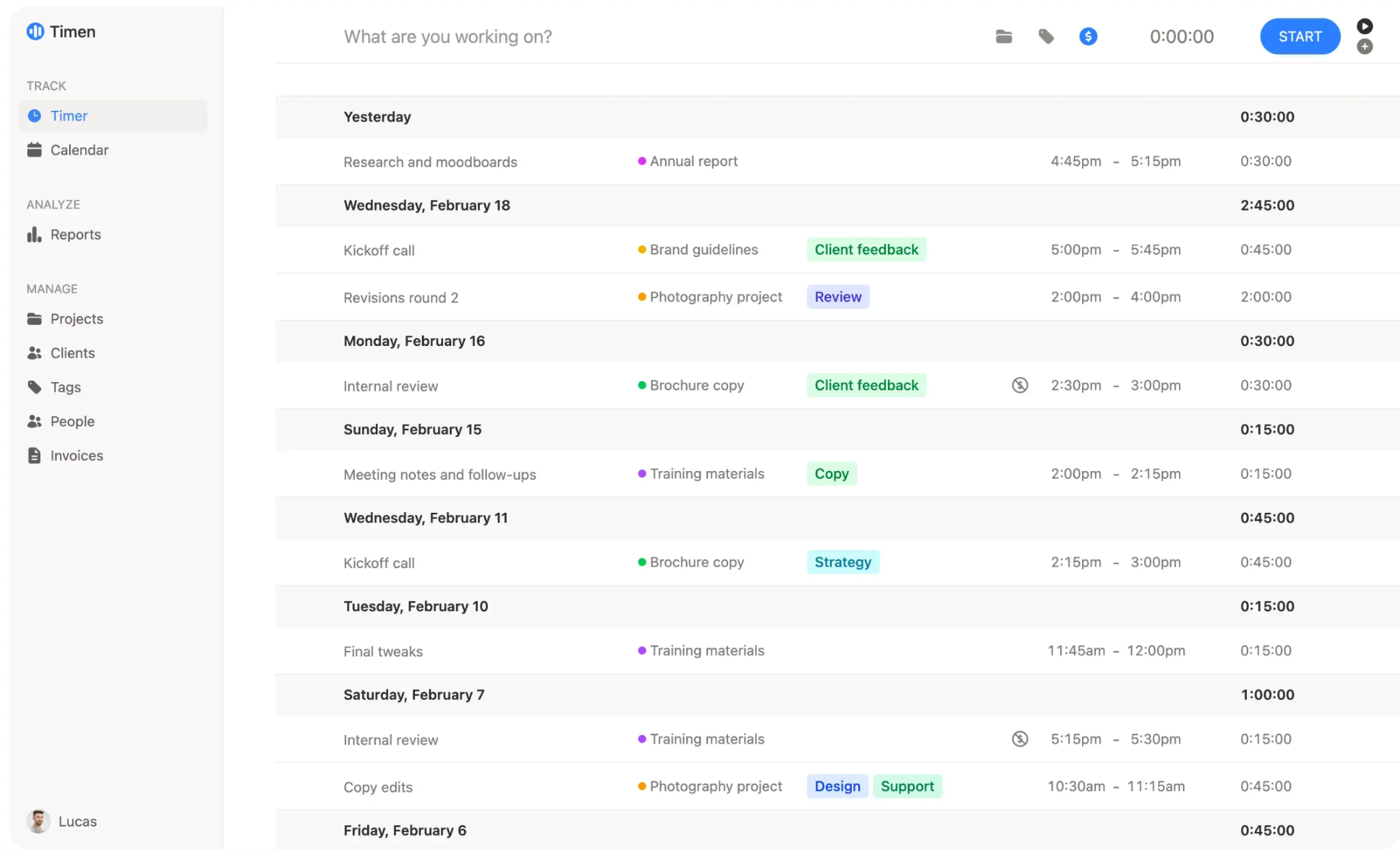
Source: Timen
Timen is built specifically around the freelancer and small-team workflow: track time fast, see your week clearly, turn the hours into an invoice. What you get:
- A timer that starts in one click
- Manual entries that need only a project and a duration
- A calendar view of the week, which makes end-of-day gap-filling fast because you can see the holes
- Reports by client, project, and date range
- Free, everything included, no feature tiers
The feature that matters most for this audience is the built-in invoicing. Tracked hours convert directly into client invoices inside the tool, with CSV and PDF exports for anything that needs to leave it. That closes the loop most trackers leave open: the hours you log are the hours you bill, with no reconciliation step in between where revenue quietly leaks.
The trade-offs are real and worth knowing. Timen is not a project management tool. There are no task boards, no budgets-versus-actuals, no resource planning. Integrations are minimal too, so if you need tracked time flowing automatically into QuickBooks or Asana, you'll be working with exports. Timen bets everything on being fast enough to use consistently, and accepts a smaller footprint as the price.
Best for: solo creatives and studios under ten people who bill by the hour and want the shortest possible path from tracked time to sent invoice.
If you only need to know where the hours go: Toggl Track
Toggl Track is the most familiar name in lightweight tracking, and for pure observation it's excellent. The timer is fast, the apps are polished, and the free plan covers up to five users, which makes it a sensible starting point for a team that has never tracked anything.
The limits appear the moment tracking needs to produce money:
- Invoicing is not Toggl's strength
- Billing-oriented reports (hours by client this month, billable versus non-billable, what's uninvoiced) take more assembly than they should
- Many users end up running a separate invoicing tool and copying numbers between the two, which reintroduces exactly the manual step a tracker should remove
Best for: freelancers on retainer or project-based pricing who track time for self-knowledge rather than billing, and teams that want a free, low-commitment way to build the habit first.
If you want tasks, time, and invoices in one system: Paymo
Paymo takes the opposite bet from Timen. Instead of doing one thing minimally, it bundles task management, time tracking, and invoicing into a single small-business work platform. For a small studio that has outgrown sticky notes but doesn't want a separate PM tool, tracker, and invoicing app, that consolidation is attractive. There's a free plan for a single user, and paid plans start at around $6 per user per month.
The cost of the breadth is surface area. Paymo presents projects, task lists, schedules, and settings that a pure tracker never shows you, and the time tracking sits inside that larger structure. Logging an hour means operating a project management tool, not just a timer.
Best for: small teams of three to ten that genuinely want light project management and are happy to accept a busier interface in exchange for fewer subscriptions.
If the budget is zero: Clockify
Clockify's free plan, with unlimited users and basic tracking and reports, remains the most generous in the category. For a team that isn't sure time tracking will stick at all, free is the right price for an experiment.
The honest framing: Clockify is where you prove the habit, not necessarily where you stay. Invoicing, budgets, and the reports you'll eventually want sit in paid tiers, and the product's expansion into scheduling, PTO, and expenses has made it busier than a small creative team needs. If the habit sticks and billing matters, you'll likely migrate within a year. That's fine, as long as you expect it.
Best for: teams testing whether time tracking will survive contact with their actual workflow, before spending anything.
A note on the heavyweight options
Harvest, and platforms like it, deserve a mention precisely because this article doesn't recommend them for this audience. They're capable systems with strong invoicing, expense tracking, and deep reporting, but they're engineered for agencies with fifteen-plus people, layered billing rates, and someone whose job includes maintaining the configuration. A freelancer setting up Harvest is doing enterprise admin for a company of one. If you grow into needing approval workflows and per-role rates, you'll know, and you can migrate then.
The same logic applies to monitoring tools that screenshot your screen and score your activity. You are your own boss. Surveilling yourself solves nothing.
The habit is the product
Whichever tool you pick, the mechanics of making it stick are the same:
- Track as you switch, not at day's end. Memory-based logging is fiction-writing.
- Spend five minutes each evening filling gaps while the day is still recoverable. A calendar view makes this nearly automatic.
- Check one number weekly: hours worked versus hours that will appear on an invoice. That ratio tells you more about the health of a freelance business than revenue does.
It's worth saying that the hours you reclaim from admin are also creative capacity. The same teams that keep tracking lean tend to streamline production busywork too, increasingly by letting AI handle the repetitive parts of ad creation. Every hour that doesn't go to admin or grunt work goes back into billable output.
Choosing in one afternoon
The decision doesn't need a spreadsheet. If you bill hourly and want invoices out of your tracked time, start with Timen. If you're only after self-knowledge, Toggl's free plan answers the question. If you want light project management bundled in, trial Paymo. If you're not sure tracking will stick, run the experiment free on Clockify.
Then apply the only test that matters: open the tool's reports at the end of next month. If your weeks are mostly there, you chose well. If they're mostly empty, the tool added too much friction for your reality. Switch to a lighter one and try again. The best time tracker for a freelance business isn't the most powerful one. It's the one that's still running in month three.








Privacy is important to us, so you have the option of disabling certain types of storage that may not be necessary for the basic functioning of the website. Blocking categories may impact your experience on the website. View Our Privacy Policy


