
Your Guide to Creating Viral Content with an AI Shorts Maker
An AI shorts maker is a piece of software that takes the grunt work out of creating short videos for platforms like YouTube Shorts, TikTok, and Instagram Reels. It uses artificial intelligence to do things like write a script, pick out visuals, create a voiceover, and add captions, which saves a massive amount of manual editing time.
Why AI Is Changing the Game for Short-Form Video
Short-form video has totally changed how we watch things online, but let's be honest—the pressure to constantly churn out new content is a recipe for burnout. For solo creators and even small marketing teams, the daily grind of scripting, shooting, and editing is a huge hurdle. This is exactly where an AI shorts maker becomes a creator's best friend.
These tools are specifically designed to eliminate the biggest time-sinks in video production. Think about it: no more hours spent digging through stock footage for the right clip or manually syncing every single caption. AI handles these tedious jobs automatically, turning what used to be a multi-hour headache into a task you can knock out in minutes.
This frees you up to think like a strategist instead of a video editor. You can spend your time brainstorming new ideas and engaging with your community, rather than getting bogged down in the technical details.
The Power of Speed and Scale
The real magic of an AI shorts maker is the ability to create content at a speed and volume that would be impossible otherwise. Instead of pouring all your energy into one video, you can instantly generate several different versions to see what your audience actually clicks on. This is huge for A/B testing.
You can finally get real data on what works by experimenting with different:
- Hooks: Which opening line actually stops the scroll?
- Calls-to-Action (CTAs): Does "Link in bio" work better than "Drop a comment"?
- Visual Styles: Should you go for a high-energy, quick-cut edit or something more polished and cinematic?
This data-first approach takes the guesswork out of making content. You're not just throwing videos at the wall and hoping they stick; you're building a content machine that gets smarter with every post.
The real breakthrough isn't just making one video faster. It's the ability to test ten ideas in the time it used to take to produce one, giving creators an unprecedented edge in understanding their audience.
Unlocking New Creative Possibilities
Beyond just making things faster, these tools open up entirely new ways to create. For example, building a "faceless" channel with a compelling AI voice and perfectly matched stock footage is now incredibly straightforward. This is a game-changer for anyone who has great ideas but doesn't want to be on camera.
The market is clearly responding to this demand. Industry analysis predicts the AI video generator market could hit $2.34 billion by 2030, driven almost entirely by the need for more efficient short-form video creation. You can find more insights about the growing AI video market and its trends online. This kind of explosive growth isn't just a fad; it’s a clear sign that how we make video is fundamentally changing, making it more accessible for everyone.
Building Your AI Shorts Production Workflow
Taking a raw idea and turning it into a slick, shareable short video used to be a major headache. With an AI shorts maker, though, the whole thing becomes a straightforward and surprisingly fun workflow. Let's walk through how you can go from a simple concept to a finished video ready for YouTube, TikTok, or Reels.
It all starts with a solid concept. Before you touch any software, you need to know what story you're telling or what problem you're solving. Who are you trying to reach, and what's going to make them stop scrolling? The biggest mistake I see is people jumping into production without this foundation.
With a core idea locked in, it's time to script. Many AI tools, like Quickads.ai, can actually help you brainstorm hooks and lay out a script. Remember, those first three seconds are everything. Your job is to create an instant "information gap" or hit them with a visual that's too interesting to ignore.
From Text Prompt to First Draft
Once your script is ready, you move into asset generation. This is where the AI really gets to work. You'll feed your script or a detailed prompt into the AI shorts maker, and it starts interpreting your words to pull together the visuals.
Here’s a glimpse of what's happening behind the curtain:
- Scene Interpretation: The AI scans the keywords and sentiment in your script to find visuals that match. If a line mentions "skyrocketing business growth," it's smart enough to look for clips of upward-trending graphs or people high-fiving in an office.
- Asset Sourcing: It then pulls from massive libraries of licensed stock footage, images, and animations. Some of the more advanced tools can even generate brand-new AI imagery on the spot from your text descriptions.
- Automated Pacing: The AI assembles an initial cut, timing the clips to the rhythm of a voiceover or a suggested music track, giving you a rough edit almost instantly.
The real magic of an AI shorts maker is its ability to build a coherent visual story from just text. It’s like having an automated editor that makes thousands of tiny decisions for you, delivering a solid first draft in seconds.
This is a fundamental shift in the video creation process, moving from tedious manual work to creative oversight.
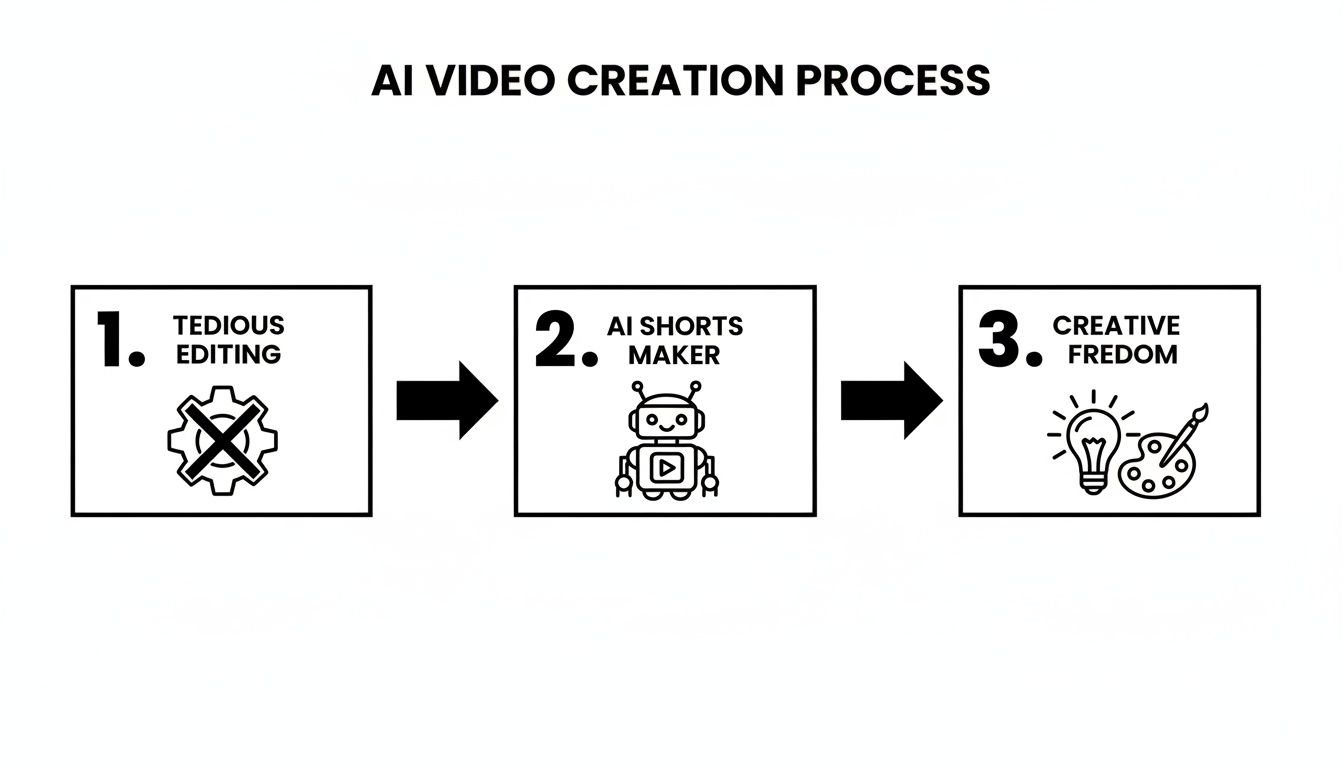
The diagram above perfectly illustrates this jump—AI handles the grunt work, freeing you up to focus on the creative direction.
Refining Your AI-Generated Short
The first version the AI spits out is almost never the final version. Think of it as a great starting point. Your job now shifts from creator to director, and you'll step in to polish the AI's work and inject your brand's unique personality.
Most AI video tools have a simple, timeline-based editor. Here's what you should focus on:
- Swap and Trim Clips: Does a certain shot feel off? Just search the library and drag in a better one. You can also easily trim clips to tighten the pacing and make your edits feel sharp and deliberate.
- Add Text Overlays and Captions: Captions are a must, since so many people watch videos on mute. The AI will generate them for you, but you need to double-check for accuracy and style them with your brand's colors and fonts.
- Select Background Music: Audio is 50% of the experience. The AI will suggest a track, but take a minute to browse the music library. Finding a song that truly fits the emotional curve of your video can make a huge difference in how it performs.
For example, let's say you're making a short about a productivity app. You might replace a generic B-roll clip of someone typing with a dynamic screen recording of your app in action. Then, you could swap the AI’s mellow background music for an upbeat, motivational track to get people excited.
Mastering Platform-Specific Formatting
Before you hit that export button, one final check: make sure your video is formatted correctly for each platform. Most short-form content is vertical, but the specs can differ just enough to cause problems like awkward cropping or a drop in quality.
Quick Guide to Platform Video Specs
Use this reference to format your AI-generated shorts correctly for major platforms, helping you maximize reach and avoid formatting issues.
Getting these details right ensures your content looks professional everywhere you post it.
By building this simple workflow—from concept and scripting to AI generation, hands-on refinement, and platform-specific formatting—you create a system you can rely on. This process lets you produce high-quality videos at scale, test new ideas quickly, and save your energy for the creative strategy that actually moves the needle.
Advanced Techniques for Standout AI Shorts
Okay, you’ve got the basics down. You know how to get the AI to spit out a decent video. Now it's time to start thinking like a seasoned creator and push beyond those default settings to make something genuinely memorable.
The real magic happens when you stop seeing the AI as just a content producer and start treating it as a creative partner. You bring the strategy and the vision; it provides the speed. The most successful people I see using these tools aren't just hitting "generate" and calling it a day. They're using that speed to experiment, refine, and dial in what works for their specific brand.
Embracing the Faceless Content Revolution
One of the coolest things AI shorts makers have enabled is the massive growth of "faceless" channels. This is a game-changer if you have great ideas but don't want to be on camera. The formula is simple: a high-quality AI voiceover paired with compelling B-roll footage.
But here’s the secret: don't just settle for generic stock clips. Your job is to curate visuals that add another layer of meaning to what the voiceover is saying. The AI gives you a starting point, but your human touch is what will make people stop scrolling.
- Curate with a Theme: Instead of just grabbing random clips, build a consistent aesthetic. Talking about focus? Find visuals with a similar color grade or mood—maybe slow-motion rain, a close-up of a ticking clock, and someone lost in a book.
- Use Visual Metaphors: This is powerful stuff. If your script is about "overcoming challenges," don't just show a person looking stressed. Find footage of a mountain climber or a boat navigating rough seas. It connects on a much deeper, emotional level.
- Vary Your Pacing: A video's rhythm is everything. Mix quick-cut montages with slower, more thoughtful shots to keep the energy dynamic and hold your viewer's attention.
With this approach, the value of your content speaks for itself. You're building an audience that shows up for your insights, not just your personality.
The Power of Rapid A/B Testing
Want to know the slowest way to grow? Guessing. A data-driven approach is always better, and an AI shorts maker finally makes it practical for video. The real advantage isn't making one video fast; it's generating several variations to test what actually works.
The core idea behind A/B testing with AI is simple but incredibly effective. Instead of spending four hours perfecting one video, you spend that time generating five different versions and let your audience tell you which one wins.
This feedback loop is what separates channels that plateau from those that see consistent growth. You stop guessing and start knowing. If you're looking for more ways to polish your output, our guide on how to boost your AI shorts editor skills has some great ideas.
A Practical A/B Testing Scenario
Let's make this real. Say you're creating a Short for a new productivity app. Don't just make one video. Use your AI tool to whip up four versions in less than an hour, each testing a specific element.
You post these and watch the analytics. Maybe you discover that the question-based hook (Video B) gets a 30% higher watch time, and asking for a comment (Video D) doubles your engagement. Boom. You now have hard data to guide your next ten videos.
This kind of insight is non-negotiable in such a crowded space. The scale of a platform like YouTube Shorts is staggering—by 2025, it had around 2.3 billion monthly active users and was hitting over 70 billion daily views. With that much noise, using AI for rapid testing is how you find your edge and build a system that can keep up. This data-first strategy ensures you’re not just shouting into the void but actively fine-tuning your message to capture and keep attention.
Smart Distribution and Performance Tracking

It’s easy to get excited after your AI shorts maker spits out a fantastic video. But here's the hard truth: creating the content is only half the battle. If you don't have a smart plan to get it in front of the right eyeballs, all that work might as well not exist.
Smart distribution isn't about blasting your video everywhere at once. It’s about understanding the unique culture of each platform and tailoring your approach.
The subtle differences between YouTube Shorts, TikTok, and Instagram Reels are massive. I've seen countless creators take a video that went viral on TikTok, post it as-is to YouTube Shorts, and hear crickets. The same caption, same hashtags—total flop. Why? Because the audience expectations are completely different.
Think Like a Native: Tailoring Content for Each Platform
The key to avoiding burnout while still getting great results is to repurpose, not just repost. You can absolutely use the same core video from your AI tool, but you have to change the "packaging" for each platform. Trust me, this little bit of extra effort pays off big time.
Here are a few things I've learned over the years:
- YouTube Shorts: People on Shorts are often on a mission—they want a quick answer, a fast tutorial, or a direct laugh. Your title is everything. Treat it like a mini-headline that screams value, something like, "3 Excel Tricks That Save Hours." The first 3 seconds are make-or-break.
- TikTok: This is the land of trends, sounds, and raw authenticity. Captions are more casual, often part of the joke. You can give your video a huge algorithmic boost just by adding a trending audio clip, even if you turn the volume way down behind your voiceover.
- Instagram Reels: Reels often feel a bit more polished and aesthetically pleasing. High-quality visuals do really well here, and don't sleep on the collaboration features. Your captions can be longer, giving you space for storytelling or a more detailed, value-packed description.
And don't forget timing. Strategically posting during the peak times for posting on TikTok (and other platforms) can give your content the initial velocity it needs to get picked up by the algorithm.
Beyond Views: The Metrics That Actually Matter
Once your short is out in the wild, it's so tempting to refresh the page and just stare at the view count. But views are a vanity metric. They feel good, but they don't tell you if your content actually worked.
To get better, you have to dig into the numbers that measure genuine engagement. A video with 10,000 views and an amazing retention rate is infinitely more valuable than a viral hit with 1 million views that everyone swiped away from after two seconds.
Forget vanity metrics like views. Your audience retention graph is the single most honest piece of feedback you will ever get. It shows you the exact moment your audience got bored and left.
When you start analyzing this data, you create a powerful feedback loop. You see where people are dropping off, you tweak your hook or your editing for the next video, and you repeat. This is how you stop guessing and start creating content that consistently performs.
The KPIs You Should Actually Obsess Over
Don't get lost in analytics paralysis. Your AI shorts maker lets you produce a lot of content, so you need a simple way to know what's working. I recommend focusing on just a few key performance indicators (KPIs).
Here are the big three:
- Audience Retention: This is your holy grail. If you see a massive drop in the first 3 seconds, your hook is broken. If there's a big dip halfway through, that part of your script was probably boring or confusing. Your goal should be to make that graph look as flat as possible for as long as possible.
- Average Watch Time: How long are people actually sticking around? A longer average watch time is a powerful signal to the algorithm that your content is high-quality. The platform's job is to keep people on the platform, and if your video does that, it will get rewarded with more reach.
- Click-Through Rate (CTR): For platforms like YouTube, the CTR on your end screens or links is critical. A high CTR means your call-to-action is compelling and your audience is engaged enough to take the next step with you.
By focusing on these data points, you'll have real, actionable insights. You can then take what you've learned and feed it right back into your AI shorts maker, crafting prompts and scripts that are already primed for success based on your own performance data.
How to Choose the Right AI Shorts Maker

The market for AI video tools is exploding. It seems like every week there's a new platform promising to be the ultimate solution for creators. But let's be real—they're not all created equal.
Picking the right AI shorts maker isn't about finding the single "best" tool on the market. It's about finding the one that actually fits your specific needs, workflow, and budget.
What works wonders for a marketing agency with a dedicated video team might be total overkill for a solo creator building a faceless YouTube channel. The trick is to look past the flashy marketing and dig into the features that will actually make a difference in your day-to-day grind.
Evaluating Core Features and Usability
First things first, let's talk about the fundamentals. How good is the tool at its core job? A clunky interface or shoddy output will just slow you down and lead to massive frustration, completely defeating the purpose of using AI in the first place.
Start by looking at the quality of the AI-generated assets. Are the AI voices robotic and monotone, or do they sound natural and engaging? A bad voiceover can instantly cheapen your content. The same goes for the stock footage library—is it filled with fresh, high-quality clips, or does it look like it's straight out of 2010?
Here are the essential features to kick the tires on:
- AI Voice Quality and Variety: Listen for a range of tones, accents, and emotional inflections. Can you tweak the speed and pitch? The more control you have, the more unique your videos will feel.
- Video Template Library: Good templates are a huge time-saver. Look for a tool with a diverse collection of styles that match your brand's vibe, from clean and corporate to high-energy and trendy.
- Editor Interface: Is the editor actually intuitive? You should be able to easily swap clips, adjust timing, and slap on text overlays without needing a PhD in video editing. A confusing UI will kill your creative momentum.
Your goal is to find an AI shorts maker that feels like a creative partner, not a technical obstacle. The right tool should accelerate your ideas, not force you into a frustrating workflow.
By focusing on these practical elements, you'll get a real sense of how a tool will perform when you're staring down a deadline.
Understanding Pricing Models: Subscription vs. Credits
Alright, you've shortlisted a few tools based on their features. Now it's time to talk money. The pricing for these platforms can be a bit confusing, but they generally fall into two buckets: monthly subscriptions and credit-based systems.
A subscription model is a no-brainer if you plan to produce a high volume of content consistently. You pay a flat fee each month for unlimited (or a very high number of) video exports. This is perfect for an agency or a creator who’s dropping new shorts every single day.
On the other hand, a credit-based model gives you more flexibility. You buy a bundle of credits, and each video you create uses up a certain amount. This is ideal if your production schedule is more sporadic—you only pay for what you actually use.
The AI video generator market is growing incredibly fast, with projections showing it could hit USD 2.34 billion by 2030. This boom means we'll see more competitive and varied pricing options pop up, which is great news for creators. You can get a better sense of these trends by reading up on the AI video generator market.
Aligning the Tool with Your Content Goals
Ultimately, the best choice boils down to your long-term strategy. Are you building a personal brand where you'll eventually mix in your own camera footage? Then you'll need a tool with a robust editor that can handle your own uploads without a hitch.
Or are you focused on creating purely faceless, informational content? In that case, a tool with the highest-quality AI voices and the deepest stock library should be at the top of your list. For a detailed breakdown, check out our guide on the 12 best short video maker tools for 2026.
My best advice? Take advantage of free trials. Spend a few hours with each of your top contenders and try to create the exact same video in each one. This hands-on comparison will tell you more about the workflow and final quality than any review ever could.
Common Questions About AI Shorts Makers
Whenever you dive into a new piece of tech, you're bound to have questions. This is especially true for AI video tools. They're powerful, for sure, but getting the most out of them means understanding what they can—and can't—do on their own.
Let's walk through some of the big questions I hear all the time from creators who are just starting out with an AI shorts maker.
Can I Actually Monetize AI-Generated Shorts?
This is usually the first question people ask, and it’s a big one. Can you really make money from these videos on a platform like YouTube?
The short answer is yes, you absolutely can.
YouTube’s monetization rules are less about how you made the video and more about the value it provides. They want to see original, transformative content. As long as you’re guiding the AI with unique scripts, carefully choosing your visuals, and injecting your own creative vision, you're generally in the clear. What they're trying to weed out is low-effort, spammy, and mindlessly auto-generated content—not creators who are simply using better tools to bring their ideas to life.
How Do I Stop My Videos From Looking So… AI?
I get it. Nobody wants their content to feel like it just came off a sterile, digital assembly line. The default output of any AI tool is just that—a default. It's your job to add the human element that makes it uniquely yours.
Here’s how you can make your AI-assisted videos stand out:
- Bring Your Brand Onboard: The best tools let you upload a brand kit with your specific logos, fonts, and color palettes. This is a non-negotiable step for creating a consistent look and feel.
- Be a Visual Curator, Not a Taker: Don’t just settle for the first stock clip the AI throws at you. If your script says "growth," think past the cliché seedling sprouting in fast-motion. Maybe it’s a shot of a potter shaping clay on a wheel or an artist adding the final brushstroke to a painting. Get specific.
- Direct the AI Voiceover: A robotic voice can kill an otherwise great video. Play with the pacing, experiment with the pitch, and add emphasis where it matters. Tiny tweaks can make a synthetic voice sound surprisingly natural and emotionally resonant.
It's a mistake to think the goal is to have the AI do 100% of the work. The real magic happens when you let the AI handle the 80% of tedious, time-sucking tasks. That frees you up to pour all your creative energy into the 20% that actually makes your content special.
Embracing this mindset is what separates the pros from the amateurs.
How Can I Write Better Prompts to Get Better Videos?
The old saying "garbage in, garbage out" has never been more true than with AI. The quality of the video you get is a direct reflection of the quality of the instructions you give. Learning to write a great prompt is probably the single most important skill you can develop.
So, what does a better prompt look like?
It’s all about being the director. Give clear, detailed instructions.
- Get Hyper-Specific: Don't just say, "a video about marketing." Instead, try something like: "Create a 30-second, high-energy TikTok explaining the 'Hook, Story, Offer' framework. Use bold, glitch-effect text animations and fast-paced clips of people collaborating in a modern office."
- Set the Mood: What should the video feel like? Use emotional keywords in your prompt. Are you going for "inspirational and uplifting," "urgent and exciting," or "calm and educational"?
- Give it a Structure: You can literally outline the video in your prompt. For instance: "Start with a thought-provoking question on screen. Then, show three quick tips as bullet points with supporting visuals. End with a clear call-to-action to download our free guide."
The more context you give the AI, the closer its first draft will be to what you envisioned. This saves you an incredible amount of time on the backend, letting you focus on polishing a great video instead of fixing a mediocre one.
Ready to stop spending hours on manual editing and start creating high-performing videos in minutes? quickads.ai gives you the power to generate stunning image ads, video ads, and YouTube shorts effortlessly. Sign up for free and experience the future of content creation.









Privacy is important to us, so you have the option of disabling certain types of storage that may not be necessary for the basic functioning of the website. Blocking categories may impact your experience on the website. View Our Privacy Policy


