Skip to content
AI influencer / How to create
Step-by-step tutorial

How to create an AI influencer.Start with a clear character.

Choose who the persona helps, what it talks about, and how it should look and sound. Then build a small reference pack and a first content series. The goal is a character you can reproduce and direct, with a review process that catches mistakes before an audience sees them.

Before you start
In brief

Creating an AI influencer involves more than selecting a face. Prepare a character brief, approved product material, a content plan, and a clear owner for review. Decide whether you need a fictional brand persona, a one-off presenter, or an authorized digital version of a real person. That choice affects the assets, permissions, and production process.

Before you start

Gather the inputs before generating the face.

01

Audience and role

Write who the host speaks to and which problem it helps explain. Choose topics it should not cover.

02

Brand and product references

Collect visual guidance, accurate product images, pronunciation notes, and approved facts.

03

An approval owner

Choose who signs off the identity, script, and complete export. Save decisions in one place.

The tutorial

Create the persona in seven steps.

01

Define the audience and the role

Describe who should watch and the useful job the character does for them. Choose a subject narrow enough to support a coherent first series. Write down topics the persona should not speak about.

Save before moving onThe audience, role, tone, and content boundaries.
02

Document the visual identity

Choose distinctive but reproducible features, a wardrobe palette, and a small number of settings. Start with a neutral portrait and additional approved views. Avoid basing the character on an identifiable person without permission.

Save before moving onApproved reference images and written identity notes.
03

Choose the voice and delivery

Define pace, pronunciation, emotional range, and the words the presenter uses. Make a short sample before writing a long script. If using a real person's voice, establish permission and the intended usage first.

Save before moving onA voice reference and a pronunciation list.
04

Write the first three content ideas

Make each idea answer a different question within the same theme. Write what viewers see as well as what they hear. Separate brand facts from illustrative scenes, and identify any shot that needs real product footage.

Save before moving onScripts, shot lists, product references, and a claim evidence list.
05

Produce a small pilot batch

Use the approved references while generating the presenter assets. Combine them with the right product shots, captions, and audio in the edit. Keep rejected versions so you can describe recurring production problems precisely.

Save before moving onSource files, finished exports, and the references used for each asset.
06

Review consistency and accuracy

Check face, hands, speech, timing, text, packaging, scale, and claims. Watch on a small screen with sound on and off. A human reviewer should approve the complete asset, including its captions and destination.

Save before moving onA reviewed master and a short change log.
07

Launch a measured first series

Describe the persona clearly as AI-generated and use an intentional publishing plan. Choose the result that matters before launch. Reuse the identity while improving the topics, openings, and demonstrations from observed results.

Save before moving onA results note and the next set of content briefs.
Worked example

A brief your next editor can actually use.

Illustrative character brief
FieldExample
RoleCalm home-organization host for apartment renters.
VoiceDirect, patient, short explanations; supplied product names checked.
Visual rulesApproved reference portraits, wardrobe palette, and room references.
BoundariesNo invented personal purchases or unsupported product outcomes.
First three topicsIntroduce the series; explain one product; answer one buyer question.
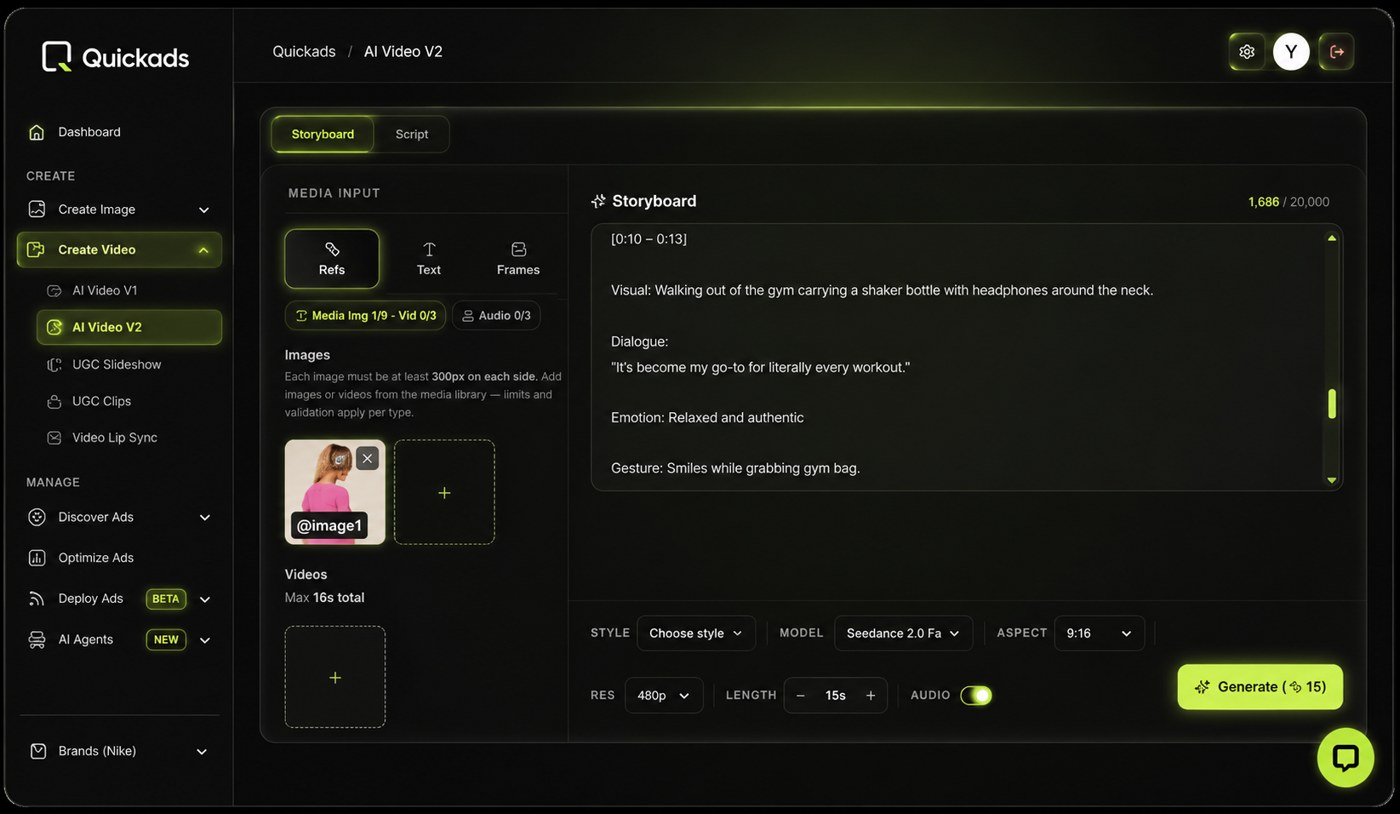
QuickAds storyboard interface reference. Use a shot list to connect each spoken line to its visual.
Final review

Approve the complete asset, not just the portrait.

Production checklist only. Selections stay in this page session.

Questions

How to create, answered.

How do I create an AI influencer from scratch?

Define a character and audience, approve visual and voice references, write a first series, produce a small pilot, and review it before publishing. Save the references and decisions so future assets remain consistent.

How do I make an AI influencer look consistent?

Use approved references, document the features that must stay fixed, and test different angles and expressions early. Review each new asset against the reference pack rather than relying on memory.

Do I need coding skills to create an AI influencer?

Some production tools use visual interfaces and do not require coding. You still need a clear brief, suitable source material, editing decisions, and quality review. Choose the tool around the output you need.

Can I create an AI influencer for free?

A free tool or trial may help you explore a concept. Check its export limits, usage terms, and the time required to produce usable content. A prototype and an ongoing production program have different costs.

Can an AI influencer use a real person's face or voice?

An authorized digital version of a person is a different project from a fictional character. Establish permission, scope, and usage terms before creating or distributing it.

What should my first AI influencer post be?

Choose a simple piece that establishes the character's role and provides something useful. A short explanation of one real product question is easier to review than a complex multi-scene story.

How to create · next step

Bring your first character brief

Tell us the brand, audience, and content idea. You do not need a finished character to start the conversation.

Book a call
Bring your first character brief

Tell us the brand, audience, and content idea. You do not need a finished character to start the conversation.

Loading the brief form…

Prefer to talk? Book a call with the team.

Privacy policy